Visiting Indonesia
Bali eSIM for Winter or Summer Travel: Dry vs Wet Season Data Needs
Bali has no winter or summer, only a dry season around June to September and a wet season around December to March. The same Bali eSIM works in every month; what changes is how much data you use.

Contents
- Does Bali have winter and summer seasons?
- Is a Bali eSIM different for winter or summer travel?
- Why does the season change how much Bali eSIM data you use?
- Dry season (about June to September)
- Wet season (about December to March)
- Bali dry season vs wet season: what changes for your eSIM?
- How much Bali eSIM data do you need for summer or winter travel?
- How to set up a Bali eSIM before your trip
- 1. Check your phone
- 2. Pay in rupiah
- 3. Scan the QR code and set the data line
- 4. When you land in Bali
- Before you fly to Bali
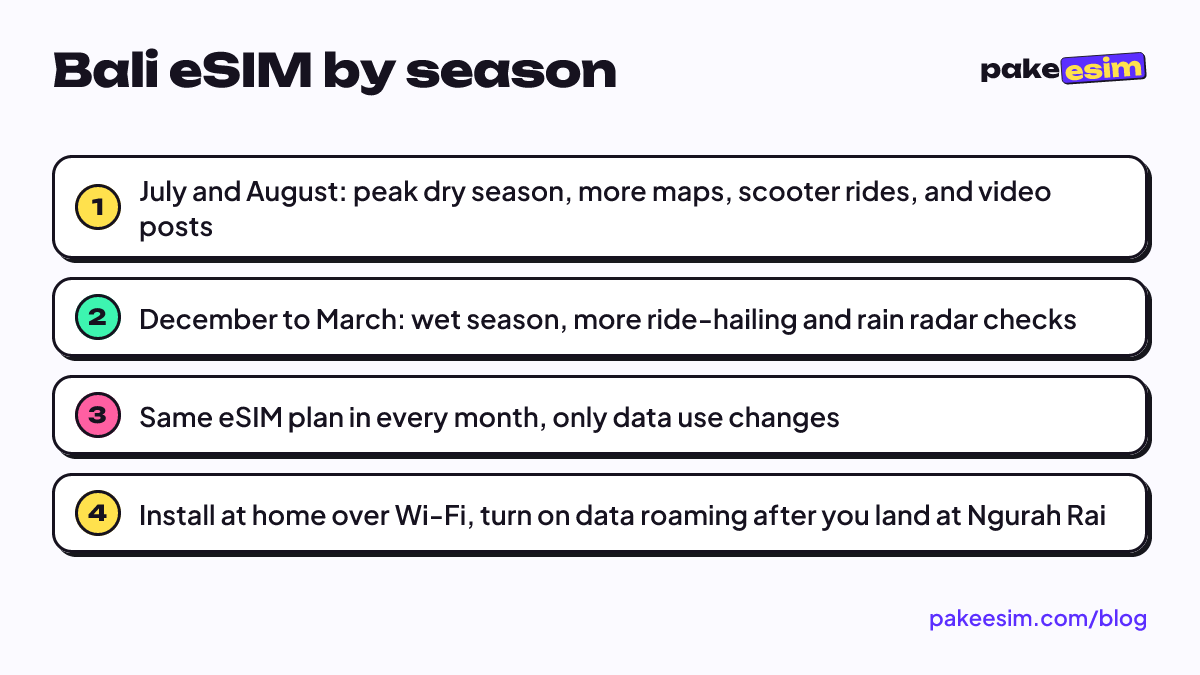
Looking for a Bali eSIM winter or summer plan? You don't need one, because Bali has no winter or summer. The island has a dry season, roughly mid-year, and a wet season around December to March. A Bali eSIM works the same in July as it does in December. What changes is how you use data: rainy afternoons mean more ride-hailing and streaming in the villa, while dry-season days mean more maps, beach clubs, and video uploads. Pick the plan size for your trip length and habits, not for the month.
Key takeaways (TL;DR)
- Bali has a tropical savanna climate with a wet season from about December to March and a dry period from about June to September, not a winter and a summer.
- A Bali eSIM is an Indonesia-wide data plan, so the same plan works in July, December, or any other month.
- Ngurah Rai Airport records about 388 mm of rain in January but only about 16 mm in August, so rain changes your plans more than your phone signal.
- For a 7 to 15 day Bali trip in either season, the 2 GB / 15 day or 4 GB / 30 day Indonesia plan fits most travelers better than 1 GB.
Does Bali have winter and summer seasons?
Bali doesn't have winter or summer in the four-season sense. Being just south of the equator, the island stays warm all year and instead swings between a wet season and a dry season, so "winter in Bali" usually just means traveling during your own home country's winter.
Wikipedia's climate data for Denpasar, Bali's capital, describes a tropical savanna climate with wet months from December to March and dry months from June to September. The months in between are transition periods. The contrast is big. The same page lists about 388 mm of rain in January at Ngurah Rai International Airport, against about 16 mm in August.
That's where the confusion comes from:
- Australians often call July and August a "winter trip to Bali." For Bali, that's the heart of the dry season and the busiest time of the year.
- Travelers from Europe, the US, Japan, or Korea often call December and January a "winter escape." In Bali, that's the wet season, plus Christmas and New Year's crowds.
- Indonesian travelers usually think in terms of school holidays, which also land in late June to July and late December.
Is a Bali eSIM different for winter or summer travel?
A Bali eSIM is the same product in every month. It's an Indonesia-wide data plan defined only by its data allowance and validity period, so a 2 GB plan used in August behaves exactly like one used in January. There's no seasonal version to choose.
The plan also isn't limited to Bali. Because it works as a roaming line on Indonesian networks, it keeps working on a fast boat to the Gili Islands or a day trip to Nusa Penida, wherever there's mobile coverage.
A few things stay the same whatever the season:
- Data only. You get mobile internet for maps, chat, and app calls, but no Indonesian phone number, no SMS, and no regular calls.
- Your home number stays on. The eSIM sits next to your main SIM, so you can still receive bank one-time codes by SMS (watch your home carrier's roaming rates).
- No top-ups. If you run out, you buy a new plan and scan a new QR code.
- Validity starts on arrival. The countdown begins when the eSIM first connects to a network in Indonesia, not on the day you buy it.
Why does the season change how much Bali eSIM data you use?
The season changes what you do all day, and that changes your data use. In the dry season you're outside more, navigating and posting. In the wet season you're more likely to call rides, check the weather, and stay inside with streaming or video calls, sometimes on villa Wi-Fi that struggles in a storm.
Dry season (about June to September)
July and August are peak months, so expect busy roads in Canggu and Seminyak and full boats to Nusa Penida. Typical data habits:
- Google Maps on a rented scooter for hours at a time
- Uploading sunset clips from Uluwatu or a beach club
- Booking boats, tours, and restaurants on the go
Wet season (about December to March)
Heavy rain usually comes in bursts, often in the afternoon or at night, so a day isn't always lost. But you'll likely:
- Call ride-hailing cars instead of riding a scooter in a downpour
- Open a weather or rain radar app several times a day
- Spend more time indoors, where hotel Wi-Fi takes over part of your usage
December adds Christmas and New Year's Eve, with lots of video posting and family calls. If your trip lands on the last days of the year, our guide to how much data a Bali New Year's Eve trip needs goes through that week in detail.
Bali dry season vs wet season: what changes for your eSIM?
The main difference between a dry-season and a wet-season Bali trip is how you move around, not how the eSIM works. This table sums up what we'd plan for:
| Dry season (about June to September) | Wet season (about December to March) | |
|---|---|---|
| Rain at Ngurah Rai | Around 16 mm in August | Around 388 mm in January |
| Crowds | Peak in July and August | Peak at Christmas and New Year, quieter in January and February |
| Main data use | Maps on a scooter, video posts, tour bookings | Ride-hailing, rain radar, streaming and calls indoors |
| Wi-Fi share | Lower, you're outside most of the day | Higher, more time in villas and cafés |
| eSIM plan | Same Indonesia plan | Same Indonesia plan |
| Order timing | Order a few days early, support is busy in holiday weeks | Order before December 30 if you land for New Year |
How much Bali eSIM data do you need for summer or winter travel?
For most Bali trips of 7 to 15 days, 2 GB is the minimum we'd suggest and 4 GB is the comfortable choice if you post a lot of video. The season shifts things slightly: a dry-season trip spent on a scooter leans toward more data, while a wet-season trip with lots of villa Wi-Fi can get by on less.
Our store's rule of thumb is that 1 GB covers roughly one day of maps, chat, and moderate social media without Wi-Fi. Most Bali stays have Wi-Fi in the villa or hotel, so your real need is usually lower than one GB per day. A rough guide:
| Trip | Season and habits | Plan that fits |
|---|---|---|
| 3 to 5 days, lots of hotel Wi-Fi | Either season, chat and maps | 1 GB / 7 days |
| 7 to 10 days, mixed use | Wet season with frequent ride-hailing | 2 GB / 15 days |
| 7 to 14 days, outdoors all day | Dry season, scooter navigation and stories | 4 GB / 30 days |
| 2 to 4 weeks, remote work or long stay | Either season, laptop hotspot | 4 GB / 30 days |
Honestly, we think 1 GB is too tight for a week in July if you navigate by scooter every day. Current prices for every Indonesia plan are in the live table below:
| Plan | Data | Validity | Price | Per day |
|---|---|---|---|---|
| eSIM Indonesia 1 GB / 7 Days | 1 GB | 7 days | Rp9.000 | ±Rp1.286 |
| eSIM Indonesia 2 GB / 15 Days | 2 GB | 15 days | Rp28.500 | ±Rp1.900 |
| eSIM Indonesia 3 GB / 30 Days | 3 GB | 30 days | Rp39.900 | ±Rp1.330 |
| eSIM Indonesia 4 GB / 30 Days | 4 GB | 30 days | Rp33.600 | ±Rp1.120 |
For a 7 to 10 day wet-season trip with plenty of villa Wi-Fi, this plan usually covers it:
For a peak dry-season holiday in July or August with daily scooter rides and lots of video, the bigger plan gives you room:
For the full picture on costs, IMEI checks, and setup, see our Bali eSIM guide for tourists.
How to set up a Bali eSIM before your trip
Install the Bali eSIM at home while you're on Wi-Fi, then turn on its data roaming after you land at Ngurah Rai. This works the same in any season, and doing it at home means you won't be hunting for airport Wi-Fi at 1 a.m. after a delayed flight.
1. Check your phone
Your phone must support eSIM and must not be carrier-locked. Dial *#06# and look for an EID, then check your cellular settings for an "Add eSIM" option. Our page for checking whether your phone supports eSIM has the full list. Dual nano-SIM iPhones with model codes CH/A and ZA/A are not supported.
2. Pay in rupiah
Pakeesim takes payment online through Midtrans: bank virtual accounts, QRIS, GoPay, ShopeePay, convenience stores, or credit card, charged in rupiah at exactly the plan price with no admin fee. The steps are in our payment guide. Unpaid orders expire after 3 hours, and support runs 08.00 to 22.00 WIB, which is 09.00 to 23.00 Bali time.
3. Scan the QR code and set the data line
As soon as your payment is confirmed, the QR code appears on your order page and arrives by email. Scan it on the phone you'll travel with, since a QR code usually works only once. Apple's own setup steps start with the same basic rule:
"Connect your new iPhone to a Wi-Fi network or hotspot." (Apple Support)
The official Apple guide to setting up eSIM on iPhone shows the exact menus, and our eSIM installation guide for iPhone and Android has step-by-step screens.
4. When you land in Bali
Set the eSIM as your cellular data line, turn on Data Roaming for that line, and switch airplane mode on and off once. Leave data roaming off on your home SIM so your carrier's roaming charges don't kick in.
If your phone was bought abroad and its IMEI isn't registered in Indonesia, the roaming eSIM still connects. Indonesia's Ministerial Regulation No. 1 of 2020 on IMEI control exempts inbound roamers using a foreign SIM from IMEI verification (Article 3, paragraph 5). Komdigi is Indonesia's communications ministry.
Before you fly to Bali
Pack a light rain jacket if you're going between December and March, and sunscreen in any month. Your eSIM doesn't care about the season, so just size the plan to your trip length and how often you'll be on Wi-Fi. When you're ready, compare every option in the Indonesia eSIM catalog.