Destinations
Canada eSIM Data 2026: How Many GB, Setup, and Fixes When It Won't Work
A Canada eSIM data plan installs in Indonesia by QR code and activates once it connects in Canada. The North America plan covers Canada, the US, and Mexico, data only with no number. For a 1–2 week holiday, 2 GB is usually enough if you use Wi-Fi.

Contents
- What is a Canada eSIM, and why is the plan called North America?
- How much Canada eSIM data do you need?
- Which plan fits how long you re staying?
- What if you need a 10 GB or 20 GB Canada eSIM?
- eSIM, roaming, or a local Canadian SIM: which one?
- How to get a Canada eSIM from Indonesia
- 1. Check that your phone supports eSIM and isn t locked
- 2. Pick a plan and pay
- 3. Scan the QR code while you re still in Indonesia
- 4. Turn it on after you land
- When does a Canada eSIM start, and what about time zones?
- Does a Canada eSIM work differently in winter or summer?
- Why is my Canada eSIM not working or not showing up?
- Installed but no signal
- The eSIM doesn t appear when you scan the QR code
- The Canada eSIM disappeared from Settings
- Does a Canada eSIM work in Indonesia?
- Before you fly to Canada
A Canada eSIM data plan is a prepaid data plan you install on your phone before you leave home, and it goes live once it connects to a network in Canada. You skip the SIM card queue at Toronto Pearson or Vancouver airport, and your Indonesian number stays on the phone for WhatsApp and bank OTP texts. At Pakeesim, Canada eSIM data is sold as a North America plan that also covers the United States and Mexico. It is data only, with no Canadian phone number. Two conditions apply: your phone must support eSIM, and it must not be carrier-locked.
Key takeaways (TL;DR)
- Pakeesim's Canada eSIM data plan is a North America plan that works in Canada, the United States, and Mexico on a single profile.
- A Canada eSIM data plan from Pakeesim includes data only, with no phone number, no SMS, and no regular calls, and it cannot be topped up.
- The validity period of a Canada eSIM starts when it first connects to a network in the destination country, not on the day you buy it.
- Canada turns its clocks back on the first Sunday of November, so the gap between Toronto and Jakarta time (WIB) grows from 11 to 12 hours.
- Apple says iPhones work best at 0 to 35 °C ambient temperature, so batteries can drain faster during a Canadian winter.
What is a Canada eSIM, and why is the plan called North America?
A Canada eSIM is a digital SIM profile loaded with mobile data and installed by scanning a QR code, with no physical card. Pakeesim doesn't sell a Canada-only plan. Instead, the North America plan covers three countries at once (Canada, the United States, and Mexico), so the same profile keeps working when you cross the border.
For a lot of travelers from Indonesia, the route to Canada is rarely a straight line. Some people transit in Seattle or Los Angeles. Others study in Vancouver and then take a break in New York. A three-country plan suits trips like that because you never have to swap eSIMs halfway. If your route does cross into the US, our guide to Canada eSIM for tourists crossing the US border covers that part in more detail.
A few things to know up front:
- This Canada eSIM is prepaid. You pay once, and when the data or the validity period runs out, the plan ends.
- There's no local Canadian number. WhatsApp, LINE, and FaceTime calls still work because they run on data.
- Plans can't be topped up. If you run out, buy a new QR code and add it as a second eSIM.
- Payment is online in Indonesian rupiah, by QRIS, e-wallet, virtual account, or card, and the total is exactly the plan price with no admin fee. See how to pay at Pakeesim for details.
How much Canada eSIM data do you need?
For a Canada eSIM data plan, the simplest rule of thumb is about 1 GB for roughly one day of maps, chat, and moderate social media. The North America plans range from 1 GB to 4 GB, so they fit travelers who lean on hotel or campus Wi-Fi for heavy use.
That's the honest number. Canada is huge, and if you road trip from Calgary to Banff while streaming Spotify and posting Instagram Stories every hour, 4 GB will feel tight. On the other hand, if you only need Google Maps, a ride-hailing app, and family chats, a small plan can last longer than that rule of thumb.
Current prices and stock are in the table below (it updates from the live catalog):
| Plan | Data | Validity | Price | Per day |
|---|---|---|---|---|
| eSIM North America 1 GB / 7 Days | 1 GB | 7 days | Rp17.100 | ±Rp2.443 |
| eSIM North America 2 GB / 15 Days | 2 GB | 15 days | Rp28.500 | ±Rp1.900 |
| eSIM North America 3 GB / 30 Days | 3 GB | 30 days | Rp39.900 | ±Rp1.330 |
| eSIM North America 4 GB / 30 Days | 4 GB | 30 days | Rp62.700 | ±Rp2.090 |
Which plan fits how long you're staying?
| Time in Canada | How you use data | Plan that makes sense |
|---|---|---|
| 3–5 days, layover or short work trip | Maps, chat, email | 1 GB / 7 days, or 2 GB if you use Maps a lot |
| 7–14 day holiday | Maps, chat, social media, Wi-Fi at the hotel | 2 GB / 15 days |
| 2–4 weeks, family visit or summer school | Moderate use, lots of time outdoors | 4 GB / 30 days |
| Over a month, or you need 10–20 GB | Remote work, streaming, hotspot | Several eSIMs in a row, or a local SIM |
In our view, 1 GB is too tight for a one-week holiday if you keep opening maps on the street. For 7 to 14 days with Wi-Fi where you sleep, the 2 GB plan is the safe middle ground.
For a longer trip, or one that includes a stop in the US, the 4 GB plan with 30 days of validity gives you more room.
What if you need a 10 GB or 20 GB Canada eSIM?
A 10 GB or 20 GB Canada eSIM isn't available as a single plan at Pakeesim, because the largest plan holds 4 GB. If you really need that much, buy a second plan when the first runs out, or consider a local Canadian SIM for a long stay.
eSIM, roaming, or a local Canadian SIM: which one?
A Canada eSIM data plan is the practical choice for a visit of a few days up to a month. Roaming with your Indonesian carrier is the simplest option but usually the most expensive, and a local Canadian SIM makes sense if you're staying for months. Compare them before you decide.
| Data eSIM (North America plan) | Telkomsel/XL/Indosat roaming | Local Canadian SIM | |
|---|---|---|---|
| Where you buy it | Online from Indonesia, before you fly | Turn on a roaming pack in your carrier's app | After arrival, at a store in Canada |
| Phone number | None, data only | Keep your Indonesian number | New Canadian number |
| Swap your physical card | No, your Indonesian SIM stays in | No | Yes, or a local eSIM if offered |
| Trips to the US and Mexico | Included in the plan | Depends on the carrier's pack | Depends on the Canadian carrier's plan |
| Best for | Holidays, work trips, family visits | People who need calls and texts on their old number | Study, work, or long stays |
Indonesian carriers change their roaming rates often, so check your carrier's app before you go. If you need a Canadian number to rent an apartment or take a part-time job, a local SIM is the better fit. For sightseeing and short visits, a data eSIM is usually enough.
How to get a Canada eSIM from Indonesia
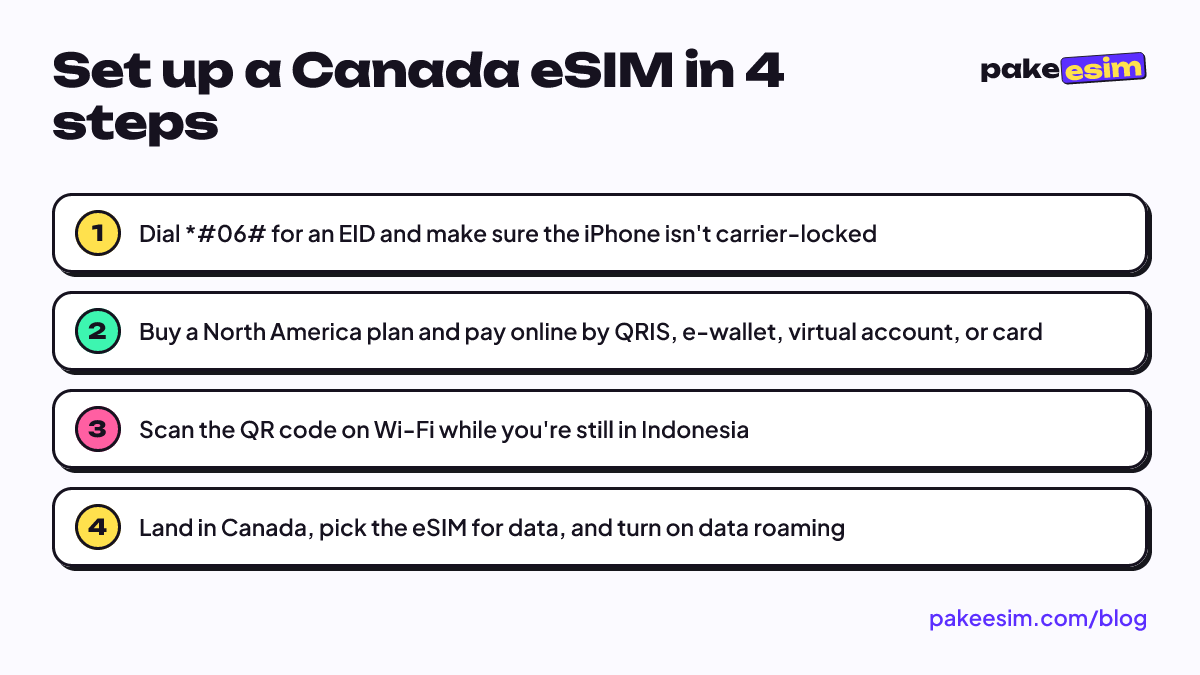
You buy a Canada eSIM online from Indonesia and install it while you're still on home Wi-Fi, before departure. You only switch on data roaming after you land in Canada. So if you're wondering how to get an eSIM for Canada, you can do it all from your phone without visiting a store.
1. Check that your phone supports eSIM and isn't locked
Your phone needs an "Add eSIM" or "Add Cellular Plan" menu and should show an EID when you dial *#06#. Check the full list on our phone eSIM compatibility checker, or read how to check eSIM support on Android phones if you use a Samsung, Pixel, or similar.
Phones bought abroad or second-hand also need a carrier lock check. On an iPhone, go to Settings, General, About, and look at the Carrier Lock line. According to Apple's guide to checking whether an iPhone is carrier-locked, the words "No SIM restrictions" next to Carrier Lock mean the iPhone is unlocked. If it says locked, an eSIM from another provider won't work even though the phone supports eSIM. Only the phone's original carrier can remove a carrier lock.
2. Pick a plan and pay
Choose a North America plan from the North America eSIM catalog. Pay on the payment page by QRIS, e-wallet, virtual account, or card for the exact plan price, with no admin fee. Unpaid orders expire after 3 hours.
3. Scan the QR code while you're still in Indonesia
Once your payment is confirmed, the QR code appears on your order page and is sent by email. Scan it while your phone is on Wi-Fi. Apple's official eSIM setup guide also lists a Wi-Fi connection as part of activation in most countries and regions. Step-by-step screenshots for iPhone and Android are in our eSIM installation guide, and there's an iPhone-only walkthrough in how to install an eSIM on iPhone.
An eSIM QR code can usually be scanned only once. Install it on the phone you're actually taking to Canada.
4. Turn it on after you land
As soon as the wheels touch down at Toronto Pearson, Vancouver, or Montréal, turn off airplane mode, set the eSIM as your cellular data line, and switch on "Data Roaming" for that line. Your Indonesian SIM can stay on to receive texts, but turn off its data roaming so you don't get charged.
When does a Canada eSIM start, and what about time zones?
A Canada eSIM activates, and its validity starts counting, the first time it connects to a network in the destination country, whatever the time of day. That makes it safe to buy a few days before you fly. What confuses people more is local time, because Canada has several time zones plus daylight saving time.
According to the National Research Council Canada page on time zones and daylight saving time, clocks are turned back on the first Sunday of November. In 2026 that falls on November 1. The rules are set by each province, so some areas differ.
Time differences from WIB (Western Indonesia Time, used in Jakarta) for the cities Indonesian travelers visit most:
- Vancouver (Pacific): 14 hours behind WIB during daylight saving time, 15 hours after November 1.
- Calgary (Mountain): 13 hours behind WIB, then 14.
- Toronto and Montréal (Eastern): 11 hours behind WIB, then 12.
- Halifax (Atlantic): 10 hours behind WIB, then 11.
Why does this matter for an eSIM? First, it helps you schedule video calls home. Second, validity is counted in days from the first connection, so if you land in Toronto at midnight and go online right away, day one is already used. If you arrive late and the airport has Wi-Fi, you can wait until morning to turn on eSIM data.
Does a Canada eSIM work differently in winter or summer?
A Canada eSIM works the same in winter and summer, because the network doesn't depend on the season. What changes is your phone and how you use it: batteries drain faster in cold air, and you use more Maps in summer because you spend more time outside.
Apple's page on maximizing battery performance says iPhones work best at 0° to 35 °C ambient temperature. It also adds this about cold weather:
"When using your device in a very cold environment, you may notice a decrease in battery life, but this condition is temporary." (Apple Batteries)
Winter in many Canadian cities often stays below freezing, so:
- Keep your phone in an inside jacket pocket, not an outside pocket or your bag.
- Bring a power bank. An eSIM that keeps searching for signal on mountain roads also drains the battery.
- Download Google Maps offline areas for Banff, Jasper, or Whistler before you go.
In summer, plan for more data. Days are longer, you're outside more, and photos and videos posted to social media eat through data faster. If you're flying in December for Christmas with family, our Canada eSIM guide for Christmas family trips works out data needs per family member.
Why is my Canada eSIM not working or not showing up?
A Canada eSIM that won't connect almost always comes down to three things: data roaming isn't on for the eSIM line, the eSIM isn't selected as the cellular data line, or the phone is still carrier-locked. Check them in order before you contact support.
Installed but no signal
- Make sure the eSIM is selected for Cellular Data.
- Turn on Data Roaming for the eSIM line.
- Switch airplane mode on and off once to force a network search.
- If there's still nothing, pick a network operator manually from the list.
The eSIM doesn't appear when you scan the QR code
If there's no "Add eSIM" menu at all, your phone probably doesn't support eSIM, or it's a dual nano-SIM variant. Certain iPhones with CH/A and ZA/A model codes don't support this eSIM. If the menu is there but the QR code is rejected, check the carrier lock status again as in step one.
The Canada eSIM disappeared from Settings
A missing eSIM was usually deleted by accident, for example during a settings reset or when removing a cellular plan. Because a QR code can usually be scanned only once, don't delete the eSIM profile while you're in Canada. If it happens, contact support with your order number.
Does a Canada eSIM work in Indonesia?
The North America plan doesn't provide data in Indonesia. You install it in Indonesia, but it only connects in Canada, the United States, or Mexico. While you're still at home, leave the profile installed with its data roaming switched off.
Before you fly to Canada
Check your phone, buy a plan that matches your trip length, scan the QR code at home, and switch on data roaming after you land. That's the whole routine. For a one- to two-week holiday, 2 GB is usually enough if you use your accommodation's Wi-Fi; for a month, or a route that includes the US, go with 4 GB.
Not sure your phone will work? Run the compatibility check first. Once you're sure, every plan is in the North America eSIM catalog. Enjoy Canada, and don't forget your jacket.