Destinations
South Korea Tourist eSIM 2026: Price, Data From Seoul to Jeju, Setup
A South Korea tourist eSIM is a digital data plan you install before the trip that goes live when you land at Incheon or Jeju. Your home number keeps working; your phone just needs eSIM support and no carrier lock.

Contents
- What is a South Korea tourist eSIM, and what is it for?
- How much does a South Korea eSIM cost?
- Why is a South Korea eSIM cheaper than roaming?
- eSIM, roaming, Korean SIM card, or pocket Wi-Fi: which one?
- How many GB does a tourist need in South Korea for 5 days, 10 days, or a month?
- Does a South Korea eSIM work in Jeju, Japan, or the USA?
- Which phones work with a South Korea eSIM?
- iPhone
- Android: Samsung, Google Pixel, Xiaomi
- How to buy and install a South Korea tourist eSIM
- Buying
- Installing
- Why is my South Korea eSIM not working?
- Is a South Korea eSIM good and safe for tourists?
- Before you fly to Seoul
A South Korea tourist eSIM is a digital data plan you install on your phone before the trip, and it switches on as soon as your plane lands at Incheon, Gimpo, Gimhae, or Jeju. There is no card to swap, your home number stays active for WhatsApp and bank codes, and you can open a map to the airport train right away. Only two conditions apply. Your phone must support eSIM, and it must not be carrier-locked. Pakeesim sells Korea plans from 1 GB for 7 days up to 4 GB for 30 days, paid in Indonesian rupiah through Midtrans.
Key takeaways (TL;DR)
- Pakeesim offers four South Korea tourist eSIM plans, from 1 GB for 7 days to 4 GB for 30 days, paid online in rupiah through Midtrans.
- A South Korea tourist eSIM from Pakeesim is data only, with no Korean phone number, SMS, or regular calls, so your home number keeps handling WhatsApp and one-time codes.
- The validity of a South Korea eSIM starts when it first connects to a network inside Korea, not when you buy it.
- A phone for a South Korea eSIM needs an EID (check by dialing *#06#) and no carrier lock; dual nano-SIM iPhones with CH/A or ZA/A model codes are not supported.
- One South Korea eSIM plan works nationwide, including Seoul, Busan, and Jeju Island.
What is a South Korea tourist eSIM, and what is it for?
A South Korea tourist eSIM is a SIM profile loaded with mobile data that only works on Korean networks. You download it to the chip already built into your phone by scanning a QR code, so no physical card gets mailed to you.
Apple puts it simply on its support page:
"An eSIM is an industry-standard digital SIM built into your iPhone, eliminating the need for a physical SIM card." (Apple Support on eSIM for iPhone)
For tourists, exchange students, or fans flying in for a concert in Seoul, day-to-day use looks something like this:
- opening maps and subway routes when you move from Hongdae to Myeongdong;
- chatting and calling through apps (WhatsApp, LINE, KakaoTalk) with family back home;
- translating restaurant menus or street signs with your camera;
- showing a concert e-ticket, a KTX ticket, or a café booking on screen;
- running a small hotspot for a travel buddy, sharing the same data.
The limits matter too. This is a data-only eSIM. You get no Korean number, no local SMS, and no regular calls. So if you searched for a "south korea esim with phone number" because a Korean app wants local verification, a data eSIM like this one won't solve that.
One common misunderstanding: your main SIM doesn't go anywhere. The eSIM sits next to your physical card, so your home number can still receive bank SMS codes when it has signal, while all internet traffic runs through the eSIM.
How much does a South Korea eSIM cost?
A South Korea eSIM at Pakeesim starts with a 1 GB plan for 7 days and goes up to 4 GB for 30 days. The table below reads straight from the catalog, so prices are current whenever you open this page, shown in rupiah.
| Plan | Data | Validity | Price | Per day |
|---|---|---|---|---|
| eSIM South Korea 1 GB / 7 Days | 1 GB | 7 days | Rp9.000 | ±Rp1.286 |
| eSIM South Korea 2 GB / 15 Days | 2 GB | 15 days | Rp28.500 | ±Rp1.900 |
| eSIM South Korea 3 GB / 30 Days | 3 GB | 30 days | Rp39.900 | ±Rp1.330 |
| eSIM South Korea 4 GB / 30 Days | 4 GB | 30 days | Rp62.700 | ±Rp2.090 |
Every Korea plan works the same way. You can use the data any time during the validity period with no daily cap, the clock only starts once the eSIM connects to a network in Korea, and plans can't be topped up. If you run out mid-trip, you buy a new plan and install a new QR code. Every plan has a fixed GB amount, and Pakeesim doesn't list which Korean carrier or whether 5G is included, so plan around the GB amount.
Why is a South Korea eSIM cheaper than roaming?
A Korea eSIM usually costs less than roaming because nothing physical is printed or shipped, you don't pay for a phone number, and the data is sized for a trip instead of a big monthly bundle. There's no shipping or admin fee, and you pay exactly the plan price.
eSIM, roaming, Korean SIM card, or pocket Wi-Fi: which one?
Tourists have four common ways to get online in South Korea, and the best one depends on your phone, how long you're staying, and how many people travel together. Here's how they compare.
| Option | Pros | Cons |
|---|---|---|
| Data eSIM | Install at home, online right after landing, home number stays active | Phone must support eSIM and not be carrier-locked |
| Roaming from your home carrier | Nothing to install, same number | Rates and data depend on the carrier; check your carrier's app first |
| Korean prepaid SIM card | Sold at the airport and convenience stores | You remove your home SIM and queue after landing |
| Rented pocket Wi-Fi | One device for several people | Needs charging every night and must be returned |
The official Seoul Tourism Organization site notes that prepaid SIM cards are sold at convenience stores around Seoul such as CU, 7-Eleven, and GS25, and rental phones are available from major carriers at the international airports. Those offline options exist, but you'll be standing in a queue after a night flight.
Our take: an eSIM makes the most sense if you travel solo or as a pair and your phone already supports it. A group of five that always moves together might save money with one pocket Wi-Fi, as long as someone agrees to carry it and charge it every night.
How many GB does a tourist need in South Korea for 5 days, 10 days, or a month?
Here's an honest rule of thumb. With no Wi-Fi at all, 1 GB lasts roughly one day of maps, chat, and moderate social media, and you can double that if you video call or watch videos often.
Because the biggest Korea plan is 4 GB, the smart move is to split the work. Do heavy stuff like photo backups, vlog uploads, or offline map downloads on your hotel Wi-Fi. Free Wi-Fi is easy to find in the capital: the Seoul Tourism Organization says Seoul has nearly 10,000 free Wi-Fi hotspots, although speeds can drop when it's crowded.
| Trip length | Usage style | Plan that fits |
|---|---|---|
| 3–7 days | Lots of hotel time, data for maps and chat | 1 GB / 7 days |
| 5–7 days | Navigation every day, frequent stories | 2 GB / 15 days |
| 10–14 days | Seoul, Busan, then Jeju | 2 GB / 15 days, or 3 GB / 30 days if Wi-Fi is rare |
| 2–4 weeks | Exchange, internship, or language course | 3 GB or 4 GB / 30 days, with a second plan ready if needed |
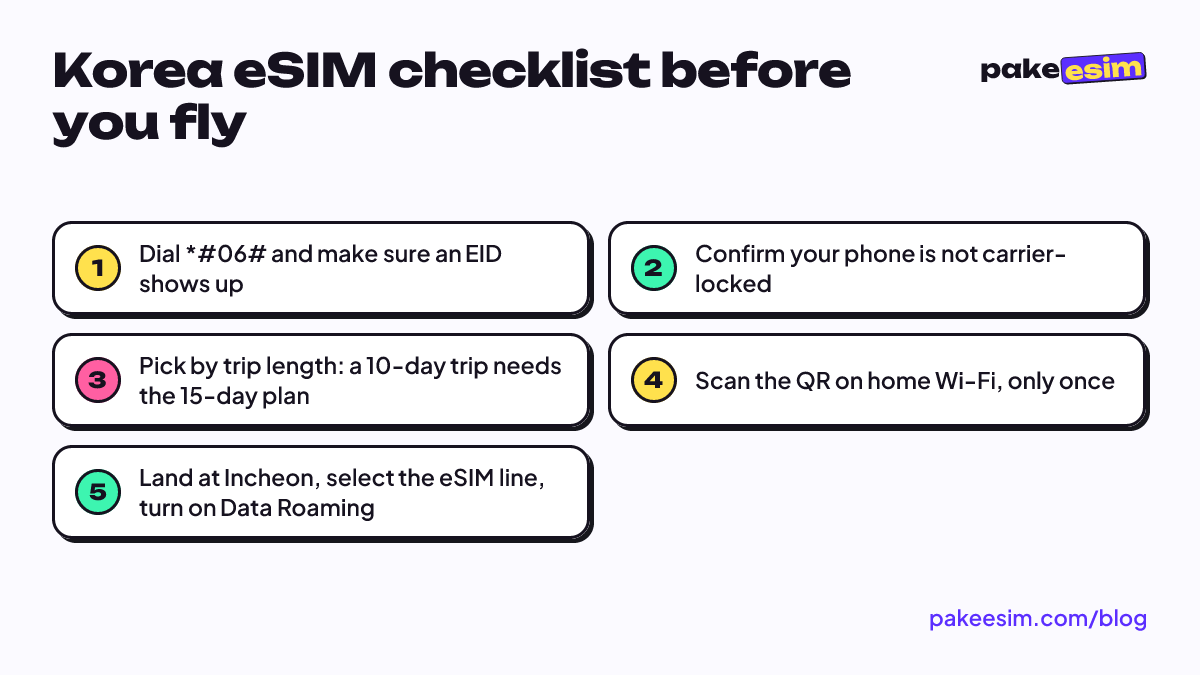
For a 10-day trip, check validity before data. A 7-day plan simply won't cover it, so the closest fit is the 15-day plan. In our view, 1 GB for 7 days only works if you're disciplined about hotel Wi-Fi; if you'll spend whole days wandering Seongsu and Bukchon with a map open, take 2 GB.
Exchange students or language-course students staying a month are usually more comfortable with the largest plan. Dorm and campus Wi-Fi carries the heavy load, and the eSIM handles daily getting around.
Does a South Korea eSIM work in Jeju, Japan, or the USA?
A South Korea eSIM works across all of South Korea, so the same profile keeps running when you fly from Gimpo to Jeju or take the KTX to Busan. It does not work in Japan or the USA, because the plan only connects to Korean networks.
If your route crosses borders, say Tokyo first and then Seoul, one Asia eSIM covering 20 countries includes Japan, South Korea, Hong Kong, and Taiwan without swapping profiles at the border. If Japan is your main stop, the data math is in our Japan eSIM guide for tourists.
Which phones work with a South Korea eSIM?
A South Korea eSIM works on phones that have an eSIM chip and no carrier lock. Phone requirements are where buyers most often get burned, so check before checkout. Your phone must:
- have an EID, which appears when you dial *#06# in the phone app;
- have an "Add eSIM" or "Add Cellular Plan" option in mobile settings;
- not be carrier-locked (SIM lock);
- not be a dual nano-SIM iPhone with a CH/A or ZA/A model code.
iPhone
Apple lists eSIM support from iPhone XS, XS Max, and XR onward. You can check carrier lock status in Settings, General, About. If it says "No SIM restrictions", your iPhone is unlocked according to Apple's carrier lock guide. Full setup steps are in our guide on how to install an eSIM on iPhone, from QR scan to data roaming.
Android: Samsung, Google Pixel, Xiaomi
For a Korea eSIM on Android, don't guess from the brand or price. Samsung's support site keeps a list of Galaxy phones that support eSIM, from the S20 to the S26 series plus the Z Fold and Z Flip lines, noting that support can vary by region. Google's Pixel help pages say the Pixel 3a and later support eSIM, and the Pixel 7 and later can run two eSIM profiles at once.
Xiaomi, Oppo, Vivo, and other brands are trickier, since one series can have eSIM and non-eSIM versions depending on the market. The safest route is the EID and menu check above, our phone eSIM compatibility checker, or the guide to Android phones with eSIM support and how to check your model.
Purchases made for a phone that doesn't support eSIM or is still carrier-locked are the buyer's responsibility. Five minutes of checking costs far less than a plan you can't install.
How to buy and install a South Korea tourist eSIM
Buy your South Korea eSIM a few days before you fly. Validity only starts once it connects in Korea, so no data is wasted. Buying from the Soekarno-Hatta departure lounge at 2 a.m. is not a great plan.
Buying
- Pick a plan from the South Korea eSIM catalog.
- Check out, then pay on the Midtrans payment page: bank virtual accounts, QRIS, GoPay, ShopeePay, convenience stores, or credit card. Payment is in rupiah, and the total is exactly the plan price with no admin fee.
- The order is confirmed automatically once paid. The QR code appears on your order page and is emailed to you.
- Unpaid orders expire after 3 hours, so finish paying in one go.
Installing
- Connect your phone to Wi-Fi at home, before you leave.
- Scan the QR with the phone you're taking. The QR can only be scanned once, so don't test it on a spare phone.
- Label the new line, for example "Korea", so it doesn't get mixed up with your home SIM.
- After landing, set the Korea eSIM as your mobile data line and turn on Data Roaming for that line.
Illustrated steps for iPhone and Android are in the eSIM setup guide.
Why is my South Korea eSIM not working?
A South Korea eSIM that isn't working is almost always a settings issue, not a broken profile. Run through this list before you panic on the Incheon Airport platform.
- You're still at home. The Korea plan only works on Korean networks, so "No Service" in Jakarta is normal.
- Data Roaming is off. The switch must be on for the eSIM line, not your home SIM.
- Wrong data line. Make sure the Korea eSIM is selected for mobile data.
- No network yet. Toggle airplane mode on and off once. If it's still empty, pick a network operator manually from the list.
- The phone is carrier-locked. If the eSIM failed to install in the first place, recheck the carrier lock status in the phone section above.
If everything checks out and it still won't connect, contact customer support with your order number. Every order is handled by staff, so they can look it up directly.
Is a South Korea eSIM good and safe for tourists?
A South Korea eSIM is a good fit for most tourists whose phones support eSIM and who need data for maps, chat, and social media, and it's safe because the profile sits on your phone's chip like a normal SIM without moving your home number. It suits heavy users less, especially anyone planning hours of streaming without Wi-Fi.
On safety, the thing to guard is the QR code. Don't post a screenshot of it in group chats or on social media, because that QR is effectively your "card". Also, an eSIM can't be pulled out of a lost phone the way a physical card can be removed in seconds.
A South Korea eSIM won't work in Indonesia or anywhere else outside Korea, and you don't need it to. Pakeesim is an Indonesian store, so customer support is in Indonesian and payment is in rupiah; travelers without an Indonesian bank account or QRIS app won't be able to check out.
Before you fly to Seoul
Check your phone first, size your data by trip length and how much hotel Wi-Fi you can count on, then buy a few days ahead and install while you're still home. The moment your wheels touch down at Incheon, you can message family and find the AREX route to your hotel. Still unsure? Look at the price table again or compare with all plans in the catalog. Have a great trip, and save some suitcase space for the skincare your friends will ask you to bring back.