Destinations
Thailand eSIM for New Years: How Many GB, Countdown Crowds, Fixes
A Thailand eSIM works on New Year's Eve and New Year's Day like any other night. Install it on Wi-Fi at home, pick a 4 GB plan for a week-long holiday trip, and expect slower data in countdown crowds.

Contents
Yes, a Thailand eSIM works on New Year's Eve and New Year's Day exactly like on any other night. Searches for a Thailand eSIM for New Years usually come down to three worries: will it still connect at midnight, how many GB does a Christmas to New Year trip need, and why does data crawl at the countdown. The short version is to install it on Wi-Fi at home, take the 4 GB plan for a week-long trip, and send the fireworks video once the crowd thins out.
Key takeaways (TL;DR)
- A Thailand eSIM keeps working on December 31 and January 1, because validity counts days from the first connection in Thailand, not calendar dates.
- The store's rule of thumb is that 1 GB of Thailand eSIM data covers about one day of maps, chat, and moderate social media.
- For a 5 to 7 day Thailand trip over New Year, the 4 GB plan valid for 30 days is the safest pick, with hotel Wi-Fi for video calls.
- Thailand and Jakarta both run on UTC+7, so the midnight countdown in Bangkok happens at the same moment as in Indonesia.
- Thailand eSIM plans are data only, with no Thai number, and payment is online in rupiah by QRIS, e-wallet, virtual account, or card, with the total matching the plan price exactly.
Can a Thailand eSIM be used on New Year's Eve?
A Thailand eSIM can be used on New Year's Eve with no special setting, since the plan runs on the same Thai networks every day of the year. The validity period starts when the eSIM first connects in Thailand, so a plan activated on December 28 simply keeps counting through January 1 and beyond.
Two things change over the holidays, though. Crowds get much bigger, and your own data use goes up. People film the fireworks, video call family, and order a Grab at 1 a.m. along with everyone else on the street. The plan itself is fine. What you need to plan for is the GB and the timing.
The same answer covers Christmas time. December and January are peak season in Thailand, and the eSIM behaves the same on December 25 as on a quiet weekday in March. If you are still deciding when to go, our comparison of Thailand eSIM data for winter or summer travel looks at December against April.
How much data for a Christmas to New Year trip in Thailand?
A Christmas to New Year trip in Thailand needs more data than a normal week, so plan on the 4 GB plan for 5 to 7 days and lean on hotel Wi-Fi for video calls. The store's rule of thumb is about 1 GB per day for maps, chat, and moderate social media, and double that if you stream or video call often.
Being honest, the biggest plan is 4 GB, which is less than a full week at that rule of thumb. It works when your hotel or hostel has decent Wi-Fi and you treat mobile data as the outdoor line for Maps, Grab, and messages. If you post Instagram stories all day, budget for a second plan.
| Trip over New Year | Typical use | Plan that fits |
|---|---|---|
| 3 to 4 days in Bangkok | Maps, Grab, chat, a few photos | 2 GB / 15 days |
| 5 to 7 days, Bangkok plus Phuket or Pattaya | Maps, social media, countdown videos | 4 GB / 30 days |
| 8 to 14 days across Christmas and New Year | Heavy social media, some video calls | 4 GB / 30 days, plus a second plan if it runs out |
| Mostly hotel Wi-Fi, short city break | Messages and Maps only | 1 GB / 7 days |
Live prices for every Thailand plan, in rupiah, are below.
| Plan | Data | Validity | Price | Per day |
|---|---|---|---|---|
| eSIM Thailand 1 GB / 7 Days | 1 GB | 7 days | Rp17.100 | ±Rp2.443 |
| eSIM Thailand 2 GB / 15 Days | 2 GB | 15 days | Rp28.500 | ±Rp1.900 |
| eSIM Thailand 3 GB / 30 Days | 3 GB | 30 days | Rp39.900 | ±Rp1.330 |
| eSIM Thailand 4 GB / 30 Days | 4 GB | 30 days | Rp62.700 | ±Rp2.090 |
For most holiday trips we would skip the 1 GB plan. One countdown video upload and a long Grab ride with Maps open can eat a large slice of it in one night. The 4 GB plan gives you room for the busy nights around December 31 and January 1.
A Thailand eSIM cannot be topped up. When the data runs out, you buy a new plan and scan a new QR code, which takes a few minutes on hotel Wi-Fi. Our Thailand eSIM guide for tourist trips has the full per-day breakdown for Bangkok, Chiang Mai, and the islands.
Why is my Thailand eSIM not working at the countdown?
A Thailand eSIM that slows down or stops loading at midnight is usually caught in network congestion, not broken. Thousands of phones around one riverside or beach countdown share the same cell towers, so uploads stall even when you have full bars. Data normally recovers within an hour as the crowd moves on.
If the eSIM shows no signal at all, the cause is usually a setting. Check these in order:
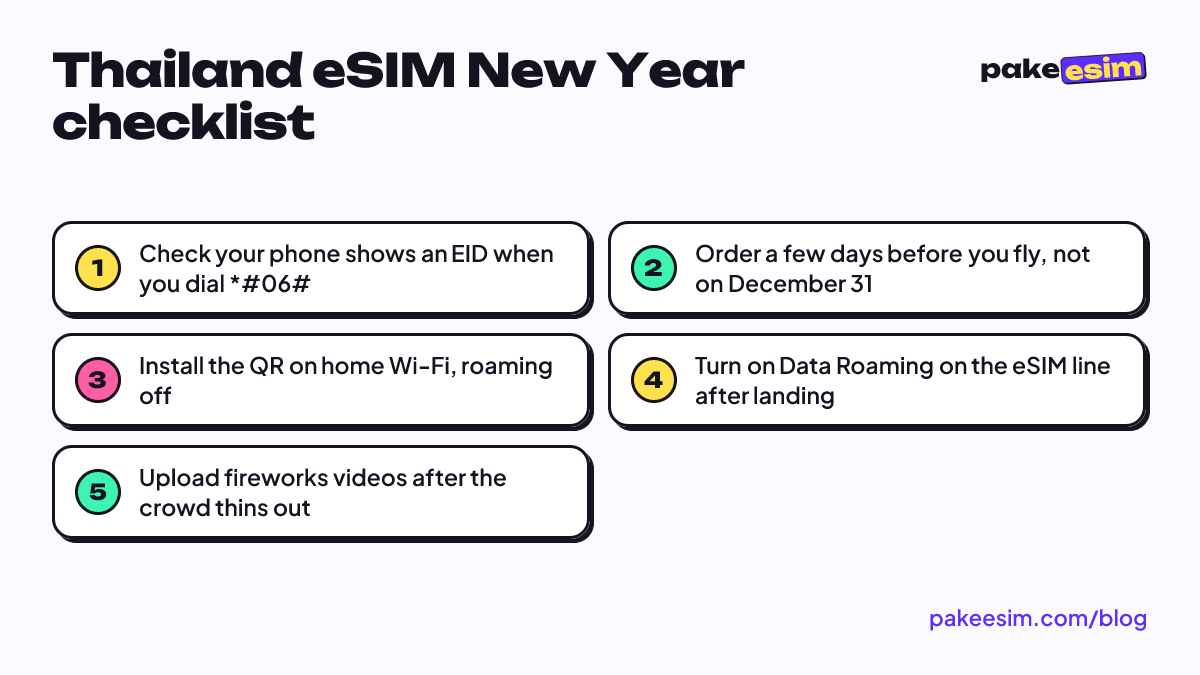
- Cellular Data points to the eSIM. On a dual SIM iPhone, Apple notes that only one number at a time can use cellular data, so pick the Thailand line under Settings > Cellular > Cellular Data.
- Data Roaming is on for the eSIM line. Apple's travel page explains that roaming with an eSIM works the same as with a physical SIM, so the eSIM needs Data Roaming switched on.
- Airplane mode on and off once. This forces the phone to search for a Thai network again after landing.
- Pick a network manually. If it still finds nothing, turn off automatic network selection and choose an operator from the list.
The illustrated version of these steps is in our eSIM installation and activation guide. For the crowd problem itself, a few habits help. Download offline Google Maps for your area before the evening. Screenshot your hotel address and booking. Agree on a meeting point with friends in case messages lag right after midnight.
When should you order a Thailand eSIM before the holidays?
Order a Thailand eSIM a few days to a week before you fly, because validity only starts at the first connection in Thailand, not on the purchase date. Ordering early also keeps you clear of the holiday rush and of support hours.
A few practical points for a late December trip:
- Payment is online, in rupiah. Checkout goes through the payment page, where you can pay by QRIS, e-wallet, bank virtual account, convenience store, or card. The total matches the plan price exactly, with no admin fee, and the order confirms automatically once payment clears.
- Unpaid orders expire after 3 hours. Pay soon after checkout or the order closes and you start again.
- Check your phone first. The phone must support eSIM and must not be carrier-locked. Apple lists eSIM support from the iPhone XS, XS Max, and XR onward, and our phone eSIM compatibility checker covers Android models too.
One small bonus for travelers from Indonesia is that Thailand uses UTC+7, the same clock as WIB in Jakarta. The countdown in Bangkok and the one at home happen at the same moment, and support hours line up with Thai local time.
Before you fly to Bangkok
Install the Thailand eSIM at home over Wi-Fi, keep Data Roaming off until you land, and switch Cellular Data to the eSIM at the airport. Your Indonesian number stays in the phone for bank OTP texts, while LINE and WhatsApp calls run over the eSIM data. If you are traveling over Christmas and New Year, take the 4 GB plan, save heavy uploads for the hotel, and enjoy the fireworks without staring at a loading bar. You can compare every plan on the Thailand eSIM plans page.