Destinations
Thailand eSIM for Tourist Trips: Plans, Data per Day, and Fixes
A Thailand eSIM lets tourists get online the moment they land in Bangkok or Phuket, with no SIM counter queue. Plans run from 1 GB for 7 days to 4 GB for 30 days, data only, priced in rupiah and paid online by bank virtual account, QRIS, e-wallet, or card.

Contents
- Is eSIM available in Thailand for tourists?
- Thailand eSIM, tourist SIM card, or roaming: which one fits?
- Thailand eSIM plans and prices
- How much Thailand eSIM data do I need?
- Does your phone support a Thailand eSIM?
- How to set up a Thailand eSIM before you fly
- Step 1. Order and pay
- Step 2. Scan the QR code
- Step 3. Switch on after landing
- Can a Thailand eSIM work in the USA or other countries?
- Why is my Thailand eSIM not working?
- Before you fly to Bangkok
Yes, Thailand has eSIMs for visitors, and a Thailand eSIM for tourist trips is the quickest way to get online after landing at Suvarnabhumi, Don Mueang, or Phuket. You scan the QR code at home on Wi-Fi, switch on data roaming when the plane touches down, and walk straight past the SIM counter queue. Pakeesim's Thailand plans are data only, run from 1 GB for 7 days to 4 GB for 30 days, and are paid in rupiah by QRIS, e-wallet, virtual account, or card. The one real catch is your phone. It must support eSIM and must not be carrier-locked.
Key takeaways (TL;DR)
- A Thailand eSIM for tourists is a data-only plan installed by QR code before departure, so it connects as soon as you land without visiting an airport SIM counter.
- Pakeesim's Thailand eSIM comes in four sizes as of October 2026: 1 GB for 7 days, 2 GB for 15 days, 3 GB for 30 days, and 4 GB for 30 days.
- Validity on a Thailand eSIM starts when it first connects to a network in Thailand, not on the day you buy it.
- Physical SIM cards sold in Thailand must be registered in person with a passport, and non-Thai nationals are limited to three SIMs per provider.
- A Thailand eSIM works only inside Thailand, so a route adding Vietnam or Cambodia needs the Asia eSIM and a route adding the United States needs the Global eSIM.
Is eSIM available in Thailand for tourists?
eSIM is widely available in Thailand for tourists. You can buy a travel data eSIM online before you leave, or buy a tourist SIM from a Thai carrier after you arrive. Both connect to local networks in Bangkok, Chiang Mai, Phuket, and Pattaya. The difference is where you do the setup work.
A travel eSIM is a digital SIM profile you download by scanning a QR code. Nothing goes in the SIM tray. Your Indonesian SIM stays in the phone, so WhatsApp, calls, and bank OTP texts keep arriving on your home number while the eSIM handles mobile data.
A Thai tourist SIM is a different route. Thai rules require in-person registration. According to Tilleke & Gibbins' summary of Thailand's 2026 SIM registration rules, identity checks for foreigners are done primarily by passport, registration happens at a branch or authorized dealer, and people without Thai nationality may hold at most three SIMs per provider. Foreign buyers have also had their face scanned against their passport photo since the biometric rule reported by Pattaya Mail on Thailand's SIM face-scan checks came in. None of that is hard. It just happens at the end of a long flight, in a queue.
Thailand eSIM, tourist SIM card, or roaming: which one fits?
A Thailand eSIM fits most short trips best if your phone supports it, because it is ready before you board. A Thai tourist SIM card suits people who want a Thai number or very large data bundles and don't mind the airport counter. Roaming from your home carrier needs the least effort, but check the pack price against the table below before you activate it.
| Thailand eSIM (travel) | Thai tourist SIM card | Roaming from your Indonesian carrier | |
|---|---|---|---|
| Setup | Scan a QR code at home | Buy and register at a counter in Thailand | Activate a roaming pack |
| Passport and face scan | Not at a counter | Required in person | Not needed |
| Thai phone number | No, data only | Yes | No, you keep your home number |
| Home number stays active | Yes, alongside the eSIM | Only on dual-SIM or eSIM phones | Yes |
| Phone requirement | eSIM support, not carrier-locked | SIM tray, not carrier-locked | None beyond roaming support |
| Payment | Rupiah, by QRIS, e-wallet, virtual account, or card | Baht at the counter | Billed by your carrier |
A Thai number matters less than people expect. Grab, Bolt, LINE, and WhatsApp all run over data. The cases where a local number helps are things like Thai bank accounts or long stays, which is a different trip from a week in Bangkok.
Thailand eSIM plans and prices
Pakeesim sells four Thailand eSIM plans, all data only, with prices shown live below in rupiah. The smallest is 1 GB for 7 days and the largest is 4 GB for 30 days. Prices can change, so the table always shows the current numbers rather than a figure that goes stale.
| Plan | Data | Validity | Price | Per day |
|---|---|---|---|---|
| eSIM Thailand 1 GB / 7 Days | 1 GB | 7 days | Rp9.000 | ±Rp1.286 |
| eSIM Thailand 2 GB / 15 Days | 2 GB | 15 days | Rp28.500 | ±Rp1.900 |
| eSIM Thailand 3 GB / 30 Days | 3 GB | 30 days | Rp39.900 | ±Rp1.330 |
| eSIM Thailand 4 GB / 30 Days | 4 GB | 30 days | Rp62.700 | ±Rp2.090 |
A few things worth knowing before you pick one:
- No daily cap. The data can be used any time during the validity period, so a heavy day in Chiang Mai and a quiet beach day in Krabi balance out.
- No top-ups. When the data runs out, you buy a new QR code and install it as a second eSIM profile.
- No Thai number, SMS, or calls. Calls happen through apps like WhatsApp or LINE.
- Hotspot works on most plans and draws from the same data.
- Validity starts in Thailand. Buying a week early is fine, since the clock starts at the first connection to a Thai network.
You can also browse the full list of eSIM plans by destination if you are comparing Thailand with neighboring countries.
How much Thailand eSIM data do I need?
Most tourists need about 1 GB per day of active use if they navigate with Google Maps, book Grab rides, and post a few stories, which is the store's own rule of thumb. If you lean on hotel Wi-Fi and download offline maps, 2 to 3 GB can stretch over a week. Video calls and streaming double the estimate.
That means the honest answer depends on how you travel. Here is how the four plans line up with typical trips:
| Trip | Typical use | Plan that fits |
|---|---|---|
| 3 to 5 days in Bangkok, hotel Wi-Fi at night | Maps, Grab, chat | 2 GB / 15 days |
| 7 days Bangkok plus Pattaya | Maps, chat, some social media | 3 GB or 4 GB / 30 days |
| 10 to 14 days Bangkok, Chiang Mai, Phuket | Daily navigation, photos to family | 4 GB / 30 days, plus a second plan if needed |
| Transit or a 2-day business visit | Email, chat, one ride | 1 GB / 7 days |
In our view, 1 GB is too tight for a full week unless you barely leave Wi-Fi. The 2 GB plan is the sweet spot for a short city break, especially if you save TikTok and YouTube for the hotel.
For a longer island-hopping trip, start with the biggest plan. Ferries to Koh Phi Phi and long van rides north eat data through maps and music, and Wi-Fi on the road is patchy.
Does your phone support a Thailand eSIM?
Your phone supports a Thailand eSIM if it has an EID and an Add eSIM menu, and it is not locked to a carrier. Most iPhones from the XS and XR onward and many recent mid-range and flagship Android phones qualify. Check both points before paying, because a purchase made for a phone that can't use eSIM is the buyer's responsibility.
Run through this quick checklist:
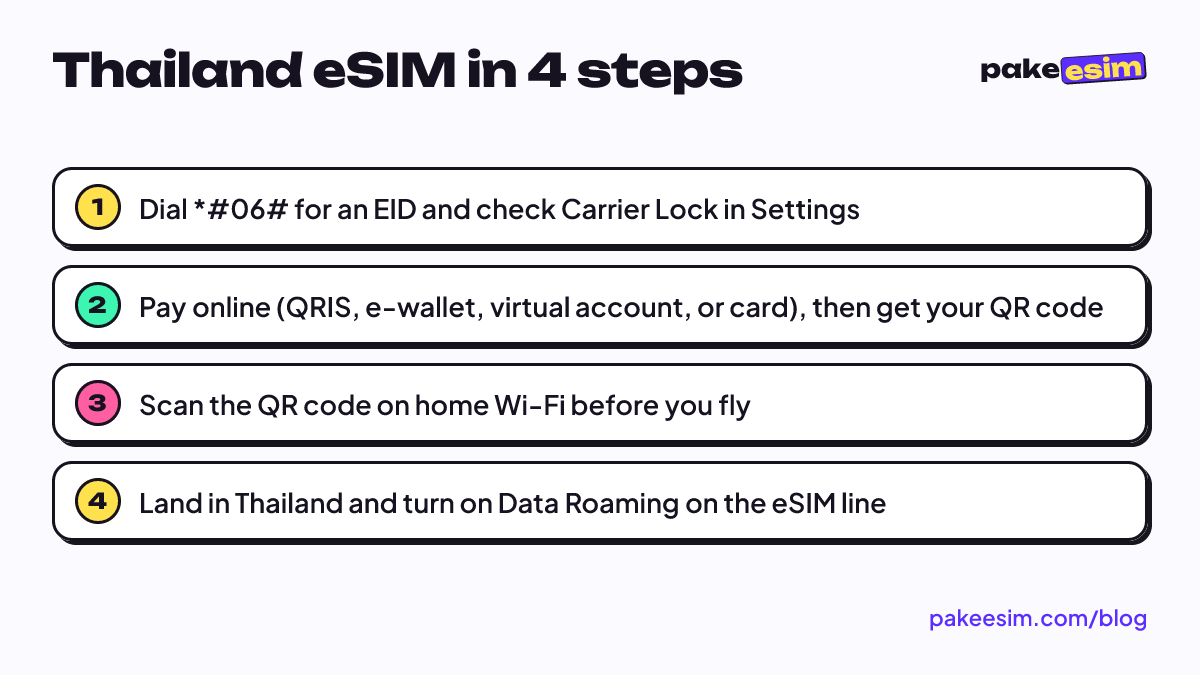
- Dial
*#06#. If an EID number appears, the phone has eSIM hardware. - Open Settings and look for Add eSIM (iPhone) or Add eSIM / Download SIM (Android).
- Check the carrier lock. On iPhone, Apple's guide to checking whether an iPhone is unlocked says to open Settings, tap General, tap About, and look for "No SIM restrictions" next to Carrier Lock.
- Look out for dual nano-SIM iPhones with model codes ending in CH/A or ZA/A, since those don't support eSIM.
If you are unsure, the phone eSIM compatibility checker walks through it, and there are model-by-model lists for iPhone eSIM compatibility and Android phones with eSIM support.
How to set up a Thailand eSIM before you fly
Setting up a Thailand eSIM takes about five minutes on Wi-Fi at home or at the airport in Jakarta or Surabaya. Install it before departure, then switch it on only after landing in Thailand. Installing at Suvarnabhumi with no internet is where most setups go wrong.
Step 1. Order and pay
Choose a plan, pay the exact plan price on the Midtrans payment page by QRIS, e-wallet, virtual account, or card, and the order is confirmed automatically. Payment is in rupiah, with no admin fee and no payment proof to upload. Unpaid orders expire after 3 hours. The payment steps are laid out separately.
Step 2. Scan the QR code
Once your payment is confirmed automatically, the QR code appears on your order page and in your email. Apple describes the flow plainly:
"If your carrier provided you with a QR code, you can use it to set up an eSIM on your iPhone." (Apple Support)
On iPhone, go to Settings, Cellular, Add eSIM, then Use QR Code. On Android, the menu is usually under Connections or Network & internet. Label the new line "Thailand" so you can spot it later. The QR code usually works only once, so don't delete the profile after installing it.
Step 3. Switch on after landing
When you land, set Cellular Data to the Thailand line and turn on Data Roaming for that line only. Keep your Indonesian SIM for calls and texts, with its roaming off if you want to avoid charges from home. Screenshots for each step are in the eSIM installation guide, and the iPhone eSIM install walkthrough covers dual-SIM settings in more detail.
Can a Thailand eSIM work in the USA or other countries?
A Thailand eSIM does not work in the USA or any country other than Thailand, because the plan is tied to Thai networks. If your trip continues to another country, you need a plan that covers that country too. Buying the right coverage up front is cheaper than discovering the gap at a layover.
- Thailand plus Vietnam, Cambodia, Malaysia, or Laos. The Asia eSIM covers 20 countries in one profile, including Thailand. The Asia eSIM travel guide explains how it works across borders.
- Thailand plus the United States or Europe. The Global eSIM covers 88 countries, Thailand and the United States among them. See the multi-country travel eSIM comparison for how to choose.
- Thailand only. Stick with the Thailand plan.
The question also comes up from travelers buying from India or elsewhere. Where you buy doesn't matter. The eSIM can be installed anywhere with Wi-Fi, and it only starts counting days once it connects in Thailand.
Why is my Thailand eSIM not working?
A Thailand eSIM that shows no service is usually set up correctly but not switched on properly. The usual causes are Data Roaming left off on the eSIM line, mobile data still pointed at the Indonesian SIM, or the phone stuck searching for a network. Each takes under a minute to fix.
Try these in order:
- Confirm the Thailand eSIM is selected as the Cellular Data line.
- Turn on Data Roaming on the eSIM line. A travel eSIM is a roaming profile, so it needs this even inside Thailand.
- Toggle airplane mode on for ten seconds, then off, to force a fresh network search.
- Turn off automatic network selection and pick a Thai operator manually from the list.
- Restart the phone.
If the eSIM still shows nothing after all five, check that the line is switched on in the SIM settings and that you didn't install it on a different phone than the one you are carrying. Then contact support with your order number. Support runs 08.00 to 22.00 WIB, which is the same clock as Bangkok.
Before you fly to Bangkok
Check your phone tonight, not at the gate. Dial *#06#, confirm there's no carrier lock, and pick a plan from how you actually use your phone on holiday rather than how you hope you will. For most week-long trips, 2 GB with good Wi-Fi habits or 4 GB without them covers it. When you are ready, the Thailand eSIM plans are a few taps away, and the QR code can sit in your phone until the wheels touch down.