Destinations
Hong Kong eSIM Tourist Guide: How Many GB, Shenzhen and Macau, Setup
A Hong Kong tourist eSIM is a data-only plan you install before you fly. For a 3 to 7 day trip, 2 GB for 15 days usually covers maps and chat. It works in Hong Kong only and needs an eSIM-capable, unlocked phone.

Contents
- Which Hong Kong eSIM plan fits a tourist trip?
- How much data does a Hong Kong tourist need?
- Does a Hong Kong eSIM work in China, Shenzhen, or Macau?
- Hong Kong eSIM with phone number: can you get one?
- eSIM vs roaming vs a local SIM card in Hong Kong
- Can Hong Kong iPhones and other phones use eSIM?
- How to use a Hong Kong eSIM on iPhone
- Before you leave Indonesia
- After you land in Hong Kong
- Why is my Hong Kong eSIM not working?
- Is a Hong Kong eSIM expensive, and how do you pay?
- Before you fly to Hong Kong
A Hong Kong eSIM for tourists is a data-only plan you install from a QR code before you fly, so your phone is online the moment you switch off airplane mode at Chek Lap Kok. For most 3 to 7 day trips, 2 GB valid for 15 days covers maps, the MTR planner, and chat, while heavier users should look at 3 or 4 GB. It covers Hong Kong only, it gives you no local phone number, and your phone must support eSIM and be carrier-unlocked.
Key takeaways (TL;DR)
- A Hong Kong tourist eSIM is data only, with no local phone number, SMS, or regular calls, while your home SIM stays active for WhatsApp and bank OTP texts.
- Hong Kong eSIM plans in the Pakeesim catalog run from 1 GB for 7 days to 4 GB for 30 days, as of October 2026.
- A Hong Kong eSIM plan covers Hong Kong only, so a trip that adds Shenzhen, mainland China, or Macau needs an Asia eSIM instead.
- Hong Kong eSIM validity starts when the eSIM first connects to a network in Hong Kong, not on the day you buy it.
- Local Hong Kong SIM cards, including prepaid ones, need real-name registration before activation under Hong Kong's registration programme.
Which Hong Kong eSIM plan fits a tourist trip?
The Hong Kong eSIM plan that fits most tourists is 2 GB for 15 days, because a typical 4 or 5 day city trip with Google Maps, the MTR route planner, and WhatsApp rarely burns through more than that when you also use hotel Wi-Fi. Pick 3 or 4 GB for 30 days if you upload a lot of video or stay longer.
Prices below are pulled live from the store, so they stay current even if this article ages.
| Plan | Data | Validity | Price | Per day |
|---|---|---|---|---|
| eSIM Hong Kong 1 GB / 7 Days | 1 GB | 7 days | Rp17.100 | ±Rp2.443 |
| eSIM Hong Kong 2 GB / 15 Days | 2 GB | 15 days | Rp28.500 | ±Rp1.900 |
| eSIM Hong Kong 3 GB / 30 Days | 3 GB | 30 days | Rp39.900 | ±Rp1.330 |
| eSIM Hong Kong 4 GB / 30 Days | 4 GB | 30 days | Rp62.700 | ±Rp2.090 |
Here is how we would read the table.
- 1 GB / 7 days suits a layover, a one-night shopping run, or a business trip where you sit on office Wi-Fi all day.
- 2 GB / 15 days is the sweet spot for a 3 to 7 day holiday with normal Maps and chat use.
- 3 GB / 30 days fits longer stays, or short trips where you post Instagram stories from the Peak every evening.
- 4 GB / 30 days is for heavy users, people who hotspot a laptop, or anyone who hates checking their data meter.
Honestly, 1 GB for a full week is tight if you rely on Maps to get around Mong Kok and Tsim Sha Tsui. It works for a disciplined Wi-Fi person, not for everyone.
How much data does a Hong Kong tourist need?
A Hong Kong tourist who uses maps, chat, and moderate social media needs roughly 1 GB per day of heavy use, based on the rule of thumb in our plan FAQ. Someone who saves video calls and uploads for hotel Wi-Fi can get through 4 to 5 days on 2 GB.
Hong Kong helps here. The government-backed Wi-Fi.HK network gives visitors free access at thousands of hotspots, and the Hong Kong Digital Policy Office page on Wi-Fi.HK says hotspots grew to around 43,000, with at least 30 minutes of free Wi-Fi per day at participating venues and no prior registration. That covers the airport, malls, and many buses, so mobile data mainly carries you between those spots.
| Trip style (Hong Kong) | Typical use | Plan to consider |
|---|---|---|
| Layover or 1 to 2 nights | Maps, chat, a few photos | 1 GB / 7 days |
| 3 to 5 day city break | Maps all day, social posts at night | 2 GB / 15 days |
| 5 to 7 days with lots of video | Stories, reels, video calls outside Wi-Fi | 3 GB / 30 days |
| 1 week or longer, or laptop hotspot | Work email, uploads, tethering | 4 GB / 30 days |
Plans cannot be topped up. If you run out, you buy a new plan and scan the new QR code, which takes a few minutes on hotel Wi-Fi.
Does a Hong Kong eSIM work in China, Shenzhen, or Macau?
A Hong Kong eSIM plan from our catalog works in Hong Kong only, so it will not give you data after you cross into Shenzhen, mainland China, or Macau. For a route that mixes those places, the Asia eSIM is the better pick because it lists Hong Kong, Macau, and China in one profile.
The Asia eSIM covers 20 countries and territories, including Taiwan, Japan, and most of Southeast Asia, and you do not need to swap profiles at the border. If your plan is a day trip from Hong Kong to Shenzhen's electronics markets or a ferry to Macau, this matters more than the GB count. We broke down the route options in our guide to eSIM plans for Hong Kong, Macau, and China, and the mainland side (apps, VPN questions, data needs) is in the China eSIM guide for tourists.
- Hong Kong only? Take a Hong Kong plan.
- Hong Kong plus Macau? Take an Asia eSIM 3 GB for 30 days or a smaller Asia plan.
- Hong Kong plus Shenzhen or Guangzhou? Take an Asia plan as well.
- Hong Kong plus Japan, Taiwan, or Thailand on one trip? See the Asia eSIM travel guide.
Hong Kong eSIM with phone number: can you get one?
A Hong Kong eSIM with a local phone number is not something a data-only travel eSIM provides, and ours is no exception. You get internet, but no Hong Kong number, no SMS, and no regular calls. App calls on WhatsApp, LINE, or FaceTime work normally over the data connection.
If you truly need a Hong Kong number, for example to receive a local delivery text, you would buy a local prepaid SIM from a Hong Kong operator. Those cards come with paperwork. The Hong Kong government's 2024 statement on SIM real-name registration says all SIM cards issued and used locally, including prepaid cards, must complete real-name registration before activation, using the user's own original identity document. The programme started on 1 March 2022, according to the government announcement on the start of SIM registration.
For most tourists, the simpler setup is to keep your Indonesian SIM in the phone for calls and OTP texts, and let the eSIM carry the data. Your WhatsApp number stays the same.
eSIM vs roaming vs a local SIM card in Hong Kong
A travel eSIM, home-operator roaming, and a local Hong Kong SIM card all get you online, but they differ in setup, paperwork, and whether you keep your own number. Here is how they compare for a short tourist trip.
| Travel eSIM (data only) | Roaming from your Indonesian operator | Local Hong Kong SIM card | |
|---|---|---|---|
| When you set it up | At home, before you fly | Activate a roaming pack before you fly | After landing, at a shop or counter |
| Local Hong Kong number | No | No, you keep your Indonesian number | Yes |
| Registration | None at the destination | None | Real-name registration with your ID |
| Swap physical SIM | No | No | Yes, unless the card is an eSIM |
| Calls and SMS | App calls only | Normal calls and SMS, roaming rates apply | Local calls and SMS |
| Payment | Rupiah, before departure | Operator billing | Hong Kong dollars, on arrival |
Roaming from Telkomsel, XL, or Indosat is the easiest if you need normal calls, but check your operator's current Hong Kong roaming packs yourself because they change often. A local SIM makes sense for long stays where a Hong Kong number is useful. For a tourist on a 4 to 7 day trip, the eSIM usually wins on effort. You scan a code at home and you are done.
Can Hong Kong iPhones and other phones use eSIM?
Most iPhones from the XS and XR onward support eSIM, but some iPhones sold in Hong Kong and Macao are dual nano-SIM models without eSIM. Apple says this directly on its Apple Support page about eSIM on iPhone: "In Hong Kong and Macao, certain iPhone models feature Dual SIM with two nano-SIM cards".
That matters if you bought your iPhone in Hong Kong on a previous trip. Our store lists two iPhone model codes as unsupported dual nano-SIM versions, CH/A and ZA/A. You can see your model code in Settings, General, About.
Before you buy any Hong Kong eSIM, check these points:
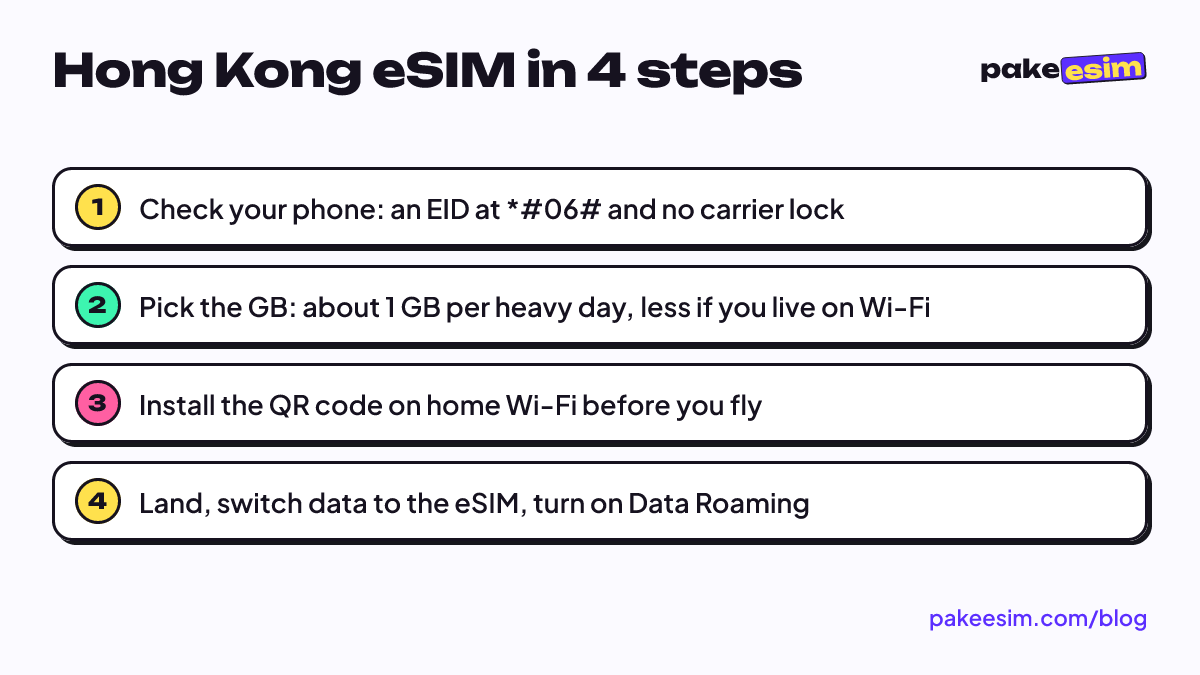
- Dial *#06# and look for an EID number. No EID usually means no eSIM.
- Look for Add eSIM or Add Cellular Plan in Settings, Cellular (iPhone) or the SIM menu (Android).
- Confirm the phone is not carrier-locked. A locked phone cannot install another provider's eSIM even if the hardware supports it.
- On Android, check the model on our phone compatibility checker, since eSIM support varies by region and model. The list of Android phones with eSIM support goes deeper.
How to use a Hong Kong eSIM on iPhone
A Hong Kong eSIM on iPhone is installed by scanning the QR code from your order page, ideally on home Wi-Fi a day or two before the flight. Apple's own instructions describe the same method:
"If your carrier provided you with a QR code, you can use it to set up an eSIM on your iPhone." (Apple Support)
Before you leave Indonesia
- Open your order page and keep the QR code on a second screen (a laptop works).
- On the iPhone, go to Settings, Cellular, Add eSIM, then Use QR Code, and scan it.
- Label the new line "HK" so you do not mix it up with your Indonesian line.
- Leave Data Roaming on the HK line off for now. The validity period starts only when the eSIM first connects in Hong Kong, so installing early does not waste days.
After you land in Hong Kong
- Set Cellular Data to the HK line.
- Turn on Data Roaming for the HK line.
- Keep your Indonesian line on for calls and texts, but make sure its own data roaming stays off so your home operator does not charge you.
Android steps are almost the same and are covered with screenshots in the eSIM installation guide. If you want the full iPhone walkthrough, read how to install eSIM on iPhone.
Why is my Hong Kong eSIM not working?
A Hong Kong eSIM that shows no signal after landing is almost always a settings issue. Either the eSIM is not chosen as the data line, Data Roaming is off on that line, or the phone has not searched for networks yet. Fix those three before anything else.
Work through them in this order.
- Data line. Go to Settings, Cellular, Cellular Data, and choose the HK line.
- Data Roaming. Open the HK line and switch Data Roaming on. A travel eSIM is a roaming connection, so it needs this even inside Hong Kong.
- Network search. Turn airplane mode on, wait 10 seconds, turn it off.
- Manual network. If there is still nothing, turn off automatic network selection and pick an operator from the list.
- Wrong place. If you are already in Shenzhen or Macau, a Hong Kong-only plan will not connect there.
If none of that works, contact us with your order number. Support runs in Indonesian from 08.00 to 22.00 WIB, which is 09.00 to 23.00 Hong Kong time.
Is a Hong Kong eSIM expensive, and how do you pay?
A Hong Kong eSIM from our catalog starts at about IDR 30,000 for 1 GB valid 7 days, and the 4 GB plan for 30 days sits at about IDR 110,000, as of October 2026. Prices can change, which is why the table above is live.
One thing international readers should know upfront. Pakeesim accepts online payment through Midtrans: bank virtual accounts, QRIS, GoPay, ShopeePay, convenience stores, or credit cards, in rupiah. You pay the exact plan price, with no admin fee, and the order is confirmed automatically once payment goes through. The QR code then appears on your order page and is also emailed to you. Unpaid orders expire after 3 hours. The full steps are on the how to pay page.
There are no admin or delivery fees, since nothing physical gets shipped.
Before you fly to Hong Kong
Check your phone first, because a phone without eSIM support or with a carrier lock is the one problem no QR code can fix. After that, the choice is simple. Hong Kong only means a Hong Kong plan, and a route with Macau or Shenzhen means an Asia plan. Install it on Wi-Fi at home, switch it on after landing, and save the big uploads for your hotel.
If 2 GB feels too tight for how you travel, the 4 GB option gives you room for a week of stories from Victoria Harbour.