Destinations
New Zealand eSIM Travel Over New Year: Validity, Time Gap, and Data
A New Zealand eSIM lasts 7, 15, or 30 days, counted from the first connection there. New Year's midnight in Auckland is 6 p.m. WIB, and the QR code arrives within minutes of payment confirmation.

Contents
- How long does a New Zealand eSIM for travel last over New Year?
- What is the time difference between New Zealand and WIB at New Year?
- How many days does it take to get a New Zealand eSIM working?
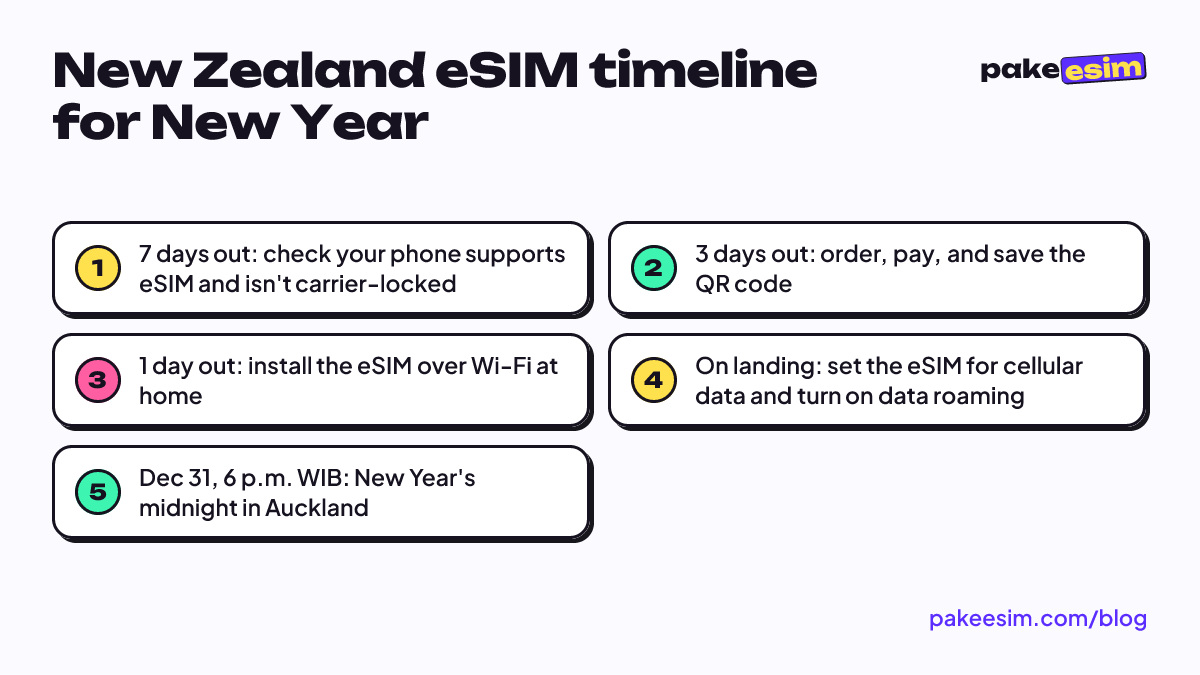
- Steps from order to working data
- New Zealand eSIM travel over New Year: how much does it cost and how many GB?
- eSIM, roaming, or a local SIM: which one for New Zealand travel?
- Why order your New Zealand eSIM early?
- Before you fly to Auckland
How long does a New Zealand eSIM for travel last over New Year? You get 7, 15, or 30 days depending on the plan, and the clock only starts when the eSIM first connects to a network in New Zealand. So if you fly out on December 27 and come home on January 8, what matters is the 13 days you actually spend there, not the day you bought it. The QR code itself usually arrives within minutes of payment confirmation. The rest comes down to data and the time difference.
Key takeaways (TL;DR)
- A New Zealand eSIM's validity period starts when it first connects to a network in New Zealand, not when you buy it.
- The Oceania eSIM plans that cover New Zealand come with 7, 15, or 30 days of validity and 1 to 4 GB of data, and they cannot be topped up.
- During New Zealand summer time (NZDT), Auckland is 6 hours ahead of WIB, so New Year's midnight there falls at 6 p.m. WIB on December 31.
- The eSIM QR code appears on your order page and is emailed to you, with customer support available 08.00 to 22.00 WIB.
How long does a New Zealand eSIM for travel last over New Year?
A New Zealand eSIM from the Oceania catalog comes in three validity lengths: 7 days, 15 days, and 30 days. The count begins when your phone first connects to a network at your destination, so buying a week before you fly doesn't eat into your days.
The plan is called the Oceania eSIM because one profile covers three countries: Australia, New Zealand, and Fiji. If your holiday goes Sydney first and Auckland second, you don't need to swap eSIMs halfway. Coverage and every plan are listed in the Oceania eSIM catalog.
How to match your trip length to a validity period:
- 5 to 7 day trips (say December 29 to January 4): the 7-day plan covers the days, but check the data section below before you commit.
- 8 to 15 day trips, the most common pattern for the year-end break, fit the 15-day plan.
- 16 to 30 day trips, like visiting relatives or a South Island road trip, need the 30-day plan.
- More than a month won't fit in one plan, because nothing runs longer than 30 days yet. You'd buy a new eSIM when the first one expires.
One thing people miss. Validity is counted in calendar days from the first connection, so if you land in Auckland at 11:30 p.m., day one is basically 30 minutes long. We think it's smarter to add one spare day when picking a plan.
What is the time difference between New Zealand and WIB at New Year?
New Zealand is 6 hours ahead of WIB (Western Indonesia Time, the Jakarta time zone) during its summer, because the country runs daylight saving time (NZDT) from late September to early April. That means New Year's midnight in Auckland happens at 6 p.m. WIB on December 31, when family back home might just be finishing the sunset prayer.
The New Zealand government spells out the rule on its official govt.nz page on daylight saving dates. Clocks go forward 1 hour on the last Sunday in September and back again on the first Sunday in April. Outside that window, the gap is 5 hours.
The time gap matters for your eSIM for three reasons:
- New Year video calls. If you want to WhatsApp your family right at midnight in Indonesia, it's already 6 a.m. on January 1 in Auckland.
- Support hours. Pakeesim support runs 08.00 to 22.00 WIB, which is 2 p.m. to 4 a.m. New Zealand time. A morning in Queenstown means the team in Jakarta is still asleep.
- Payment. Unpaid orders expire after 3 hours, so don't place an order and plan to transfer after a night's sleep.
So sort out the eSIM while you're still in Indonesia, not at Auckland Airport at 6 a.m. local time.
How many days does it take to get a New Zealand eSIM working?
Getting a New Zealand eSIM doesn't take days. Once you pay, the QR code shows up on your order page and a link is emailed to you. The slow part is on your side: checking the phone, paying, and installing the profile.
A note for readers outside Indonesia: checkout runs through Midtrans and accepts QRIS, e-wallets, bank virtual accounts, or credit card, with prices listed in rupiah.
Steps from order to working data
- Check that your phone supports eSIM and isn't carrier-locked on the phone eSIM compatibility checker. The quickest sign is an EID showing up when you dial *#06#.
- Choose a plan, check out, and pay on the Midtrans payment page: QRIS, e-wallet, bank VA, or card. The total is exactly the plan price, and the order confirms automatically once paid; details are in the payment guide.
- The eSIM QR code appears on your order page and is emailed to you. Scan it while you're still on Wi-Fi in Indonesia. Menu-by-menu steps for iPhone and Android are in the eSIM installation guide.
- Once you land, set the eSIM as your cellular data line and turn on data roaming for that line.
On iPhone, Apple's official guide describes the scan step like this.
"When the Set Up Cellular screen appears, tap Use QR code." (Apple Support)
An eSIM QR code can usually be scanned only once. Install it on the phone you'll actually carry, not on a spare that stays home.
New Zealand eSIM travel over New Year: how much does it cost and how many GB?
Oceania eSIM prices for New Zealand start with a 1 GB plan for 7 days, and the latest prices always show in the table below. Prices can change, so the table pulls straight from the catalog every time the page loads.
| Plan | Data | Validity | Price | Per day |
|---|---|---|---|---|
| eSIM Oceania 1 GB / 7 Days | 1 GB | 7 days | Rp9.000 | ±Rp1.286 |
| eSIM Oceania 2 GB / 15 Days | 2 GB | 15 days | Rp28.500 | ±Rp1.900 |
| eSIM Oceania 3 GB / 30 Days | 3 GB | 30 days | Rp39.900 | ±Rp1.330 |
| eSIM Oceania 4 GB / 30 Days | 4 GB | 30 days | Rp62.700 | ±Rp2.090 |
On data, the store FAQ gives an honest rule of thumb. 1 GB covers roughly one day of maps, chat, and moderate social media. The biggest plan right now is 4 GB. So for a 10-day trip, this eSIM makes the most sense as your on-the-go line (Google Maps, WhatsApp, checking the Waiheke ferry schedule), while video uploads and photo backups wait for hotel Wi-Fi.
| Trip length | Plan that fits | Best for |
|---|---|---|
| 5 to 7 days | 2 GB / 15 days | City only (Auckland, Wellington), lots of hotel Wi-Fi |
| 8 to 15 days | 3 GB / 30 days | Family holiday, daily Maps and chat |
| 10 to 20 days, road trip | 4 GB / 30 days | Driving the South Island, Maps on most of the day |
| More than 30 days | Two plans back to back | Long visits; buy a new one when data runs out |
In our view the 1 GB / 7 day plan is too tight for New Year in New Zealand. Countdown night tends to mean Instagram stories and video calls, and those burn through data fast.
For a typical 8 to 15 day trip, we lean toward the 3 GB plan, since 30 days of validity gives you room if your flight home slips.
If you're road-tripping from Christchurch to Queenstown with Maps running nonstop, go one step up to 4 GB.
To stretch your data, download offline Google Maps for the areas you'll drive through while you're still on Wi-Fi. Plenty of South Island roads cross empty country, and offline maps keep working when the signal drops.
eSIM, roaming, or a local SIM: which one for New Zealand travel?
A New Zealand eSIM is the most practical choice for New Year trips under a month, because you install it at home and your Indonesian number stays active for WhatsApp and bank OTP codes. An eSIM is a digital SIM profile stored in your phone, so there's no physical card to swap out.
| Option | Pros | Cons |
|---|---|---|
| Oceania data eSIM | Installed before you fly; one profile for Australia, New Zealand, and Fiji | Data only, no local number, phone must support eSIM |
| Indonesian carrier roaming | Just activate a roaming pack from Telkomsel, XL, or Indosat | Check each carrier's rates and country coverage first |
| New Zealand local SIM | You get a local number | Bought after landing; you remove your Indonesian SIM if the phone has one slot |
The limits of a data eSIM deserve a plain mention. You don't get a New Zealand phone number, you can't send SMS or make regular calls through this eSIM, and the plan can't be topped up. Calls still work through apps like WhatsApp.
If your trip also stops in Sydney or Melbourne, read the Australia eSIM guide for tourists on data and phone requirements. December is summer in the southern hemisphere, and the season question is covered in our Australia eSIM piece on winter versus summer travel.
Why order your New Zealand eSIM early?
A New Zealand eSIM for New Year is best ordered a few days before you fly, because validity only starts once it connects there, and late December is the busiest travel week of the year. Buying early costs you nothing and leaves time to fix things if your phone turns out to have a problem.
A few practical reasons:
- Time to check your phone. If it turns out to be carrier-locked, or it's an iPhone with model code CH/A or ZA/A (dual nano-SIM versions that don't support eSIM), you still have time to find another option.
- Night flights. Many routes from Jakarta or Denpasar to Auckland connect somewhere and land in the early morning. By then, support hours in Indonesia are over.
A similar time zone puzzle for another destination is covered in the USA eSIM guide for Christmas and New Year's. And if you're ringing in the new year in Indonesia instead, there's a data breakdown for a Bali eSIM on New Year's Eve.
Before you fly to Auckland
Count the days you'll actually be in New Zealand, add one spare day, then pick the 15 or 30 day plan based on how much data you need. Install the QR at home, screenshot your order page, and remember that New Year's midnight in Auckland lands at 6 p.m. WIB. When you're ready, every Oceania plan is in the Pakeesim eSIM catalog. Enjoy greeting the new year before everyone back home.