Destinations
South Korea eSIM for New Years Eve 2026: Seoul Time vs WIB, Setup, Data
South Korea runs on UTC+9, two hours ahead of Jakarta (WIB), so midnight in Seoul hits at 22:00 WIB on December 31. The eSIM QR code arrives within minutes during service hours, and 7, 15, or 30 days of validity start when you connect in Korea.

Contents
- What is the time difference between Seoul and Jakarta on New Year s Eve?
- How long does a South Korea eSIM take to set up?
- From order to working data at Incheon
- How many days and how much data does a New Year trip to Korea need?
- What happens to your phone at the Bosingak bell ceremony?
- Does Korean Lunar New Year (Seollal) change anything?
- Before you fly to Seoul
Setting up a South Korea eSIM for New Years Eve? Keep two times in mind. Korea runs on UTC+9, two hours ahead of Jakarta time (WIB, UTC+7), so midnight on January 1 in Seoul lands at 22:00 WIB on December 31. Your eSIM QR code arrives within minutes once your payment is confirmed. Validity is counted in days (7, 15, or 30) from the moment your phone first connects to a Korean network. What you need to plan around is when you order. Order confirmation closes at 22:00 WIB, the exact moment Seoul starts counting down.
Key takeaways (TL;DR)
- South Korea uses UTC+9 with no daylight saving time, so Seoul is always 2 hours ahead of Jakarta time (WIB).
- Midnight on New Year's in Seoul equals 22:00 WIB on December 31, two hours before family in Jakarta reach the new year.
- A South Korea eSIM order confirms automatically once payment goes through, and the QR code appears on your order page and is emailed.
- South Korea eSIM validity comes in 7, 15, and 30 days, counted from the first connection to a Korean network, not from purchase.
What is the time difference between Seoul and Jakarta on New Year's Eve?
Seoul is 2 hours ahead of Jakarta, and the gap stays the same all year. According to the 24timezones page on Seoul's time zone, Seoul sits at UTC+9 and doesn't observe daylight saving time. December and July use the same math.
For a year-end trip, a table beats a formula:
| Moment | Seoul time (KST) | Jakarta time (WIB) |
|---|---|---|
| Customer service opens | 10:00 | 08:00 |
| Customer service closes | 24:00 | 22:00 |
| Midnight, January 1 in Seoul | 00:00, Jan 1 | 22:00, Dec 31 |
| Midnight, January 1 in Jakarta | 02:00, Jan 1 | 00:00, Jan 1 |
| Eastern Indonesia (WIT) hits the new year | 00:00, Jan 1 | 22:00, Dec 31 |
So if you're in Myeongdong and want to video call family in Bekasi during their countdown, have your phone ready at 2 a.m. Korea time. Fun detail: Seoul and Jayapura ring in the new year at the same second, because Eastern Indonesia Time (WIT) is also UTC+9.
The 2-hour gap shifts support hours too. Payments are confirmed from 08:00 to 22:00 WIB, which in Korea means 10:00 to midnight. If something breaks at 1 a.m. in Seoul, expect a reply after 10 a.m. local time.
How long does a South Korea eSIM take to set up?
A South Korea eSIM order confirms automatically as soon as your payment goes through, any time of day. The QR code then appears on your order page and a link is sent to your email.
The slow part is on your side, not the store's. Unpaid orders expire after 3 hours, so if you check out at 23:00 WIB on December 30, make sure your payment goes through well before that window closes. One note for international readers: payment is in rupiah through Indonesian online methods, such as bank virtual accounts, QRIS, e-wallets, convenience stores, or credit card.
From order to working data at Incheon
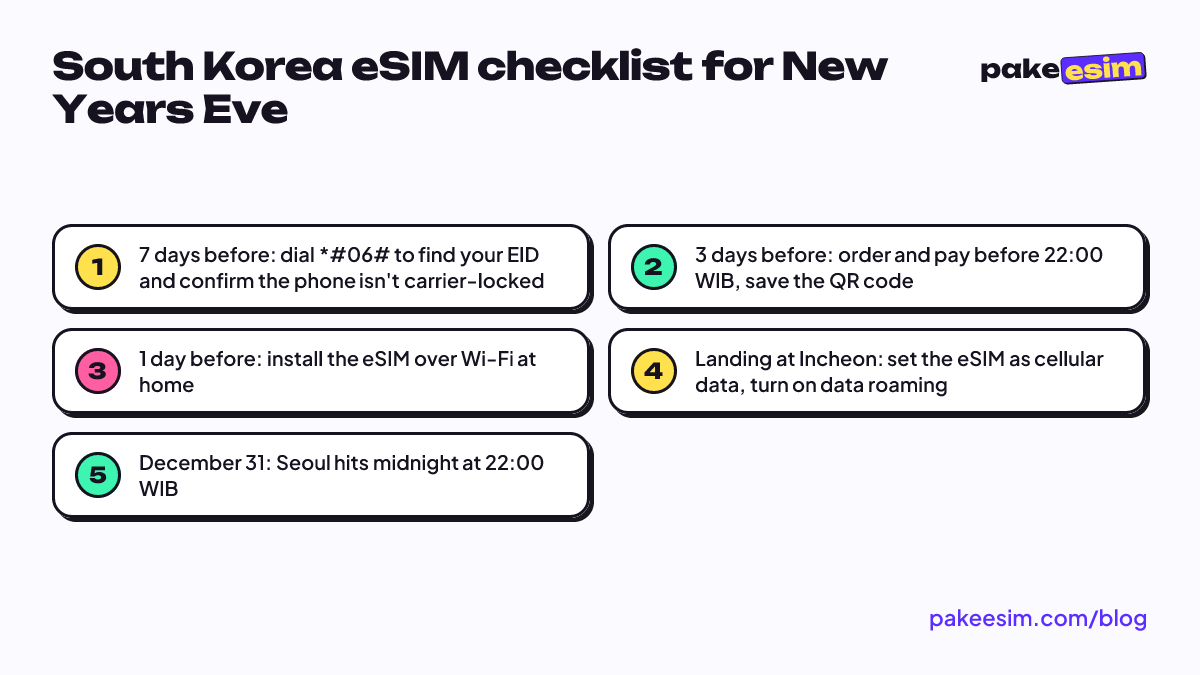
- Check that your phone supports eSIM and isn't carrier-locked on the phone eSIM compatibility checker. The fastest sign: an EID shows up when you dial *#06#.
- Check out, then pay the exact total on the payment page using QRIS, e-wallet, bank virtual account, or credit card.
- Your order is confirmed automatically once payment goes through, and the QR code appears on your order page and is emailed to you.
- Scan the QR code while you're still on Wi-Fi in Indonesia. Menu-by-menu steps for iPhone and Android are in the eSIM installation guide.
- As soon as you land at Incheon or Gimhae, set the eSIM as your cellular data line and turn on data roaming for it.
On iPhone, once the QR code is read, Apple's steps are this short:
"Tap Continue at the bottom of the screen. Tap Add Cellular Plan." (Apple Support on setting up eSIM on iPhone)
Still no signal after you leave the plane? Turn airplane mode on for about 10 seconds, then off again. If the bars stay empty, pick a network operator manually from the list.
How many days and how much data does a New Year trip to Korea need?
There are four South Korea eSIM plans, from 1 GB for 7 days up to 4 GB for 30 days, all paid in rupiah. Current prices always show in the table below because it reads straight from the catalog, so the numbers here never go stale.
| Plan | Data | Validity | Price | Per day |
|---|---|---|---|---|
| eSIM South Korea 1 GB / 7 Days | 1 GB | 7 days | Rp17.100 | ±Rp2.443 |
| eSIM South Korea 2 GB / 15 Days | 2 GB | 15 days | Rp28.500 | ±Rp1.900 |
| eSIM South Korea 3 GB / 30 Days | 3 GB | 30 days | Rp39.900 | ±Rp1.330 |
| eSIM South Korea 4 GB / 30 Days | 4 GB | 30 days | Rp62.700 | ±Rp2.090 |
Validity is counted per day, not per hour of use. The clock starts when your phone first connects to a Korean network, so buying two weeks before departure doesn't eat into your days. An overnight flight from Jakarta to Incheon doesn't count either, since the eSIM isn't connected in the air.
The store's rule of thumb: 1 GB is roughly enough for a day of maps, chat, and light social media. If you video call a lot or post stories, plan on double that. Many cafés, hotels, and stations in Korea have Wi-Fi, so cellular data gets used most on the street, when you're opening Naver Map or KakaoMap and checking subway times.
| New Year trip length | Plan that fits | Notes |
|---|---|---|
| 4 to 6 days, Seoul only | 2 GB / 15 days | Room to spare if your return slips |
| 7 to 10 days, Seoul plus Busan | 4 GB / 30 days | Maps, KTX, and a nightly video call |
| 2 to 4 weeks, light use | 3 GB / 30 days | Works if you're mostly on dorm or hotel Wi-Fi |
| Over 30 days | Two plans back to back | Plans can't be topped up |
Honestly, we think the 1 GB / 7 days plan is too tight for New Year's Eve. One fireworks video plus a 20-minute video call home can use hundreds of MB, before a full day of Maps. For short trips we lean toward 2 GB, since the 15-day validity gives you a buffer if your flight home moves.
For a week or more, or a Seoul, Busan, and Jeju route, step up to 4 GB. Buying a second QR code mid-trip is usually more hassle than the price difference.
A city-by-city comparison from Seoul to Jeju is in our South Korea tourist eSIM guide to price, data, and setup. Still weighing other gear? Read the eSIM vs pocket WiFi comparison for South Korea.
What happens to your phone at the Bosingak bell ceremony?
The bell-ringing ceremony at Bosingak Pavilion in Jongno is Seoul's busiest New Year's Eve event, so get your phone ready before you join the crowd. According to The Korea Times report on the Bosingak ceremony, it has been held every December 31 since 1953, and about 100,000 people were expected for the 2024 New Year's Eve.
The same report says subway trains skipped Jonggak Station from 23:00 to 01:00, while buses and the subway ran until 02:00. These arrangements can change every year, so check Naver Map on the day. A few practical tips from us:
- Download offline maps or screenshot your route home before heading to Jongno. If data slows down among thousands of people, you still know the way to another station.
- Battery matters more than data. December nights in Seoul often drop below freezing, and phone batteries drain fast in the cold. Bring a power bank.
- Agree on a meeting point that doesn't need a phone. Pick one spot with your travel buddies in case you get separated.
- Remember support hours. 23:00 in Seoul is still 21:00 WIB, so you can still ask about an eSIM problem. After midnight KST, support is closed.
More winter tips, from snow to batteries, are in our Korea eSIM winter vs summer article.
Does Korean Lunar New Year (Seollal) change anything?
Seollal is Korea's Lunar New Year, and in 2027 it falls on Sunday, February 7. According to the Seollal holiday calendar on publicholidays.co.kr, the holiday runs from February 6 to 9, 2027.
The eSIM math is identical. The gap is still 2 hours from WIB, and validity is still 7, 15, or 30 days from the first connection. What changes is the city. Seollal is when Koreans travel home to family, so intercity trains fill up and some small shops close. If your trip overlaps Seollal, book KTX tickets early and expect to lean on cellular data more to find restaurants that are open.
Before you fly to Seoul
Remember three numbers. Korea is 2 hours ahead of WIB, the QR code arrives within minutes between 08:00 and 22:00 WIB, and the 7, 15, or 30 days only start when you land. This eSIM is data only, with no Korean number, SMS, or regular calls, but your Indonesian number stays active on your main SIM for WhatsApp and bank OTPs. Dual nano-SIM iPhones with CH/A or ZA/A model codes don't support eSIM, so check before you buy. When you're ready, every plan is in the South Korea eSIM catalog. Happy New Year in Seoul, and don't forget to call home two hours after your own countdown.