eSIM Guides
What Is a Travel eSIM and How Does It Work? Data, Phones, and Limits
A travel eSIM is a prepaid data plan you install by scanning a QR code at home. It connects to a partner network when you land, while your home SIM keeps your number for WhatsApp and bank OTPs. Your phone must support eSIM and be carrier-unlocked.

Contents
- What is a travel eSIM?
- Travel eSIM vs the eSIM from your home carrier
- How does a travel eSIM work, step by step?
- Why does a travel eSIM need Data Roaming switched on?
- Which phones can use a travel eSIM?
- What countries have eSIM?
- How much data does a travel eSIM need?
- Can a travel eSIM share a hotspot?
- Does a travel eSIM have a phone number?
- Why travel eSIM is bad (sometimes): the honest downsides
- Why is my travel eSIM not working?
- Travel eSIM for Christmas, New Year, and cherry blossom trips
- Before you fly
A travel eSIM is a prepaid data plan that you download onto your phone's built-in SIM chip instead of inserting a plastic card. You buy it online, scan a QR code at home, and the plan connects to a partner network once you land abroad. Your home SIM stays in the phone, so your Indonesian number still gets WhatsApp messages and bank OTP texts. The catch is that your phone must support eSIM and must not be carrier-locked, and most travel eSIMs, including the ones we sell, are data only.
Key takeaways (TL;DR)
- A travel eSIM is a prepaid data plan installed by scanning a QR code, with no physical SIM card to buy or swap at the airport.
- A travel eSIM sits next to your main SIM, so your home number keeps receiving calls, SMS, and WhatsApp while the eSIM handles mobile data abroad.
- The validity of a Pakeesim plan starts when it first connects to a network at your destination, not on the day you buy it.
- An eSIM plan only works on a phone with an EID that is not carrier-locked, and some dual nano-SIM iPhones (CH/A, ZA/A) cannot use eSIM at all.
- Pakeesim plans are data only, cannot be topped up, and are paid online in rupiah with no admin fee.
What is a travel eSIM?
A travel eSIM is a short-term data plan from a provider in another country (or a regional network) that lives on your phone as a digital profile. "eSIM" stands for embedded SIM, a chip soldered inside the phone that can hold downloadable carrier profiles. The plan you buy is simply one of those profiles, sold for a trip instead of a monthly contract.
The physical part never changes. What you buy is the right to download a profile, delivered as a QR code. Apple sums up the practical upside on its page about using eSIM abroad:
"With eSIM, you don't need to obtain, carry, or swap physical SIM cards (which can also be lost), or wait for them to arrive by mail." (Apple Support on using eSIM while traveling)
People also search for a "travel eSIM card". There's no card. The phrase is just a habit from the days of buying a SIM at the arrival hall, and it means the same downloadable plan.
Travel eSIM vs the eSIM from your home carrier
Telkomsel, XL, and Indosat also offer eSIMs, but those replace or mirror your Indonesian number. A travel eSIM is a second line used only abroad. You keep the home line for your identity (WhatsApp, banking) and point mobile data at the travel line.
How does a travel eSIM work, step by step?
A travel eSIM works in two stages. At home you install the profile over Wi-Fi by scanning a QR code; at the destination you switch mobile data to that eSIM and turn on Data Roaming, and it attaches to a partner network there. Nothing is mailed and no tray is opened.
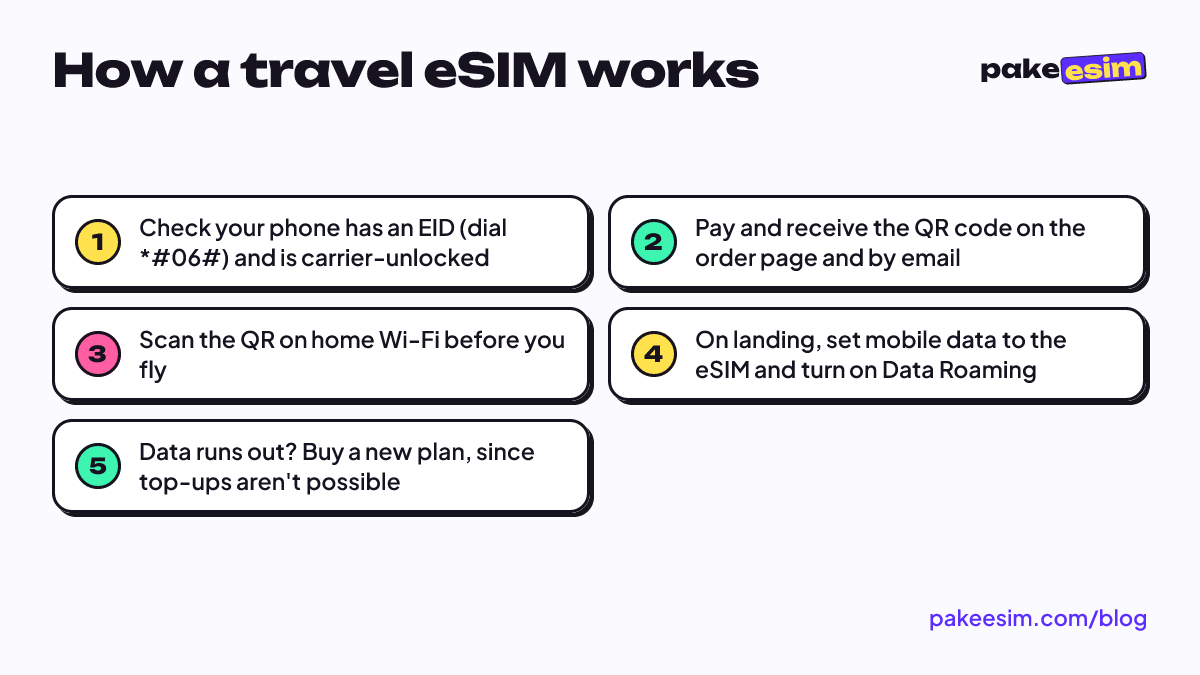
- Check the phone. Dial *#06#. If an EID appears and Settings shows "Add eSIM" or "Add Cellular Plan", the hardware is ready. Our phone compatibility checker lists models.
- Buy the plan. Pick a country or regional plan, pay online, and the QR code appears on your order page and is emailed to you.
- Install at home. Scan the QR code while you still have Wi-Fi in Indonesia. An eSIM QR code can usually be scanned only once, so do it on the phone you're actually taking.
- Activate on arrival. Choose the eSIM as the Cellular Data line, turn on Data Roaming for that line, and leave your home SIM on for calls and texts.
The illustrated steps for iPhone and Android are in the eSIM installation guide, and there's a more detailed walk-through in how to install eSIM on iPhone.
Why does a travel eSIM need Data Roaming switched on?
A travel eSIM usually rides on a local partner network as a roaming connection, because the plan comes from a provider that isn't the local operator itself. If Data Roaming is off on that eSIM line, the phone sees the network but refuses to use it. That's the normal setup, and it doesn't trigger roaming charges from your Indonesian carrier as long as mobile data stays on the eSIM line.
Which phones can use a travel eSIM?
Most iPhones from the XR and XS onward, and many recent mid-range and flagship Android phones, can use a travel eSIM. Two conditions matter more than the model name. The phone needs an EID, and it must not be locked to one carrier.
- Carrier lock. Used phones from overseas markets are sometimes locked. Apple is blunt about who fixes that: "Only your current carrier can unlock your iPhone," per Apple's carrier unlock page. Check Settings > General > About and look for "No SIM restrictions".
- Dual nano-SIM iPhones. Certain iPhones sold in mainland China, Hong Kong, and Macao (model codes ending CH/A or ZA/A) use two physical SIM slots and have no eSIM.
- Two eSIMs at once. Apple notes that "iPhone 13 models and later also support Dual SIM with two eSIMs" on its Dual SIM support page, so an iPhone 13 or newer can keep an Indonesian eSIM and a trip eSIM active together.
Android support varies by region and model even within one brand, so check the actual phone, not the spec sheet. Our guide to Android phones with eSIM support covers how.
What countries have eSIM?
eSIM is supported by carriers in most countries, and Apple keeps a country-by-country list of carriers that offer eSIM on iPhone, running alphabetically from Afghanistan to Zimbabwe. For a traveler, though, the useful question is narrower: does your travel eSIM provider have a plan that covers the countries on your route?
As of October 2026, our catalog has single-country plans for places like Japan, South Korea, Thailand, Singapore, Saudi Arabia, Turkey, the UK, and the United States, plus regional plans:
| Plan | Countries covered | Good for |
|---|---|---|
| Asia | 20 (incl. Japan, Korea, China, Hong Kong, Macau, Taiwan, most of Southeast Asia) | Multi-stop Asia trips |
| Europe | 31 (EU countries plus UK, Switzerland, Norway, Iceland) | Interrail and multi-city tours |
| Middle East | 9 (Saudi Arabia, UAE, Qatar, Turkey, Egypt, Jordan and more) | Umrah plus itineraries |
| Africa | 12 (South Africa, Morocco, Kenya, Tanzania and more) | Safaris and overland routes |
| North America | 3 (USA, Canada, Mexico) | Road trips and border crossings |
| Latin America | 12 (Brazil, Argentina, Peru, Chile and more) | Backpacking routes |
| Oceania | 3 (Australia, New Zealand, Fiji) | Trans-Tasman trips |
| Global | 88 across all continents | Round-the-world routes |
The full list sits on the destinations page. One thing to know: none of the regional or Global plans include Indonesia, because they're built for leaving it. If you're visiting Indonesia with a foreign phone, there's a separate Indonesia roaming plan.
For a route through several countries, international eSIM for multi-country travel compares regional versus single-country plans in more detail.
How much data does a travel eSIM need?
A simple rule of thumb from our store is that 1 GB covers about one day of maps, chat, and moderate social media. If you video call or stream often, double that estimate. That rule assumes a full day on mobile data, so hotel and café Wi-Fi stretch it a lot.
| Trip style | Mobile data use away from Wi-Fi | Suggested plan size |
|---|---|---|
| 2 to 4 days, offline maps, uploads on hotel Wi-Fi | Light | 1 GB / 7 days |
| 5 to 10 days, maps and chat, photos posted in the evening | Moderate | 2 GB / 15 days or 3 GB / 30 days |
| 10 to 14 days, live maps all day, daily video calls | Heavy | 4 GB / 30 days plus a second plan as backup |
| Working remotely or tethering a laptop | Very heavy | Two or more plans |
In our view, 1 GB for a full week is too tight if you rely on live Google Maps all day in a city like Tokyo or Bangkok. It only works if you download offline maps and save uploads for Wi-Fi. Live prices for every size are in the table below.
| Plan | Data | Validity | Price | Per day |
|---|---|---|---|---|
| eSIM Global 1 GB / 7 Days | 1 GB | 7 days | Rp9.000 | ±Rp1.286 |
| eSIM Global 2 GB / 15 Days | 2 GB | 15 days | Rp28.500 | ±Rp1.900 |
| eSIM Global 3 GB / 30 Days | 3 GB | 30 days | Rp39.900 | ±Rp1.330 |
| eSIM Global 4 GB / 30 Days | 4 GB | 30 days | Rp62.700 | ±Rp2.090 |
Can a travel eSIM share a hotspot?
On most of our plans, yes. Tethering and Personal Hotspot draw from the same data allowance, and any plan that restricts tethering says so on its plan page. A laptop eats data far faster than a phone, so budget at least double. If the hotspot won't start on an iPhone, the personal hotspot fixes for iPhone eSIM go through the usual causes.
Does a travel eSIM have a phone number?
No, the travel eSIMs we sell come without a local phone number. You get mobile data for maps, browsing, WhatsApp, and app calls, but you can't receive SMS or regular calls on the eSIM line. Some providers elsewhere sell plans with a number; ours are data only.
In practice that's rarely a problem, because your Indonesian SIM stays active alongside it.
- Bank OTP texts still arrive on your home number, as long as that line is on. Your home carrier may charge for incoming SMS while roaming, so check its roaming terms.
- WhatsApp keeps your Indonesian number as your account, and it runs over the eSIM's data.
- Ride-hailing and food apps that demand a local number for verification are the real gap. Sign up and verify before you leave, using your existing number.
Why travel eSIM is bad (sometimes): the honest downsides
A travel eSIM is a poor fit when your phone is carrier-locked, when you need a local number, or when you'll stay long enough that a local postpaid plan becomes cheaper. A few other limits are worth knowing before you buy.
- No top-ups. Each plan is a separate eSIM profile. When the data runs out, you buy a new QR code and install it.
- One scan. Delete the profile and the same QR code usually won't reinstall. Don't remove it "to tidy up" mid-trip.
- Payment. Checkout accepts bank virtual accounts, QRIS, GoPay, ShopeePay, convenience stores, or credit card, all in rupiah. The total matches the plan price exactly, and the order confirms automatically once paid. The payment guide shows each step.
- Support hours. Customer support is available 08.00 to 22.00 WIB if you need help choosing a plan.
Compared with the alternatives, the trade-off looks like this:
| Travel eSIM | Home carrier roaming | Local SIM card | |
|---|---|---|---|
| Setup | QR scan at home | Activate a roaming pack | Buy at airport or shop after landing |
| Home number | Stays active alongside | Same line | Usually removed from the tray |
| Local phone number | No (data only) | No | Yes |
| Phone requirement | eSIM support, carrier-unlocked | Any phone | Unlocked phone with a SIM tray |
| Online when you land | Yes | Yes | After you find a counter |
Why is my travel eSIM not working?
A travel eSIM that installed fine but shows no signal is usually a settings issue, not a broken plan. In order, check that the eSIM is selected as the Cellular Data line, that Data Roaming is on for that line, and that you've toggled airplane mode on and off once to force a network search.
- Wrong data line. On dual SIM phones, only one line handles mobile data at a time. Settings > Cellular > Cellular Data must point to the travel eSIM.
- Data Roaming off. Turn it on for the eSIM line only.
- No network registered. Toggle airplane mode, then pick an operator manually from the network list if it still says "No Service".
- Wrong country. A single-country plan won't connect during a layover elsewhere. A Japan plan does nothing in Doha.
If none of that helps, contact support with your order number. Our order tracking page resends your order link if the email went missing.
Travel eSIM for Christmas, New Year, and cherry blossom trips
December and the March to April stretch are the busiest windows for trips out of Indonesia, and both change how you should buy a travel eSIM. Order a few days ahead, not on the night before your flight. Validity only starts at the first connection abroad, so buying early costs you nothing.
- Christmas and New Year (December). Holiday traffic and countdown crowds mean more photo and video uploads, so size up one step. Southern hemisphere trips are in summer then; the Australia eSIM for winter or summer travel piece works out the GB for both seasons.
- Cherry blossom season (March to April). Japan and South Korea trips cluster around bloom forecasts, and hanami days are heavy on maps and camera uploads. Best eSIM for Japan travel matches plans to 3, 7, and 14 day trips.
- Late-night orders. Payment confirms automatically any time, but customer support is available 08.00 to 22.00 WIB if you need help choosing a plan beforehand.
Before you fly
A travel eSIM saves you the arrival-hall SIM queue and keeps your Indonesian number alive, provided the phone is eSIM-ready and unlocked. Check the phone first, pick a plan by days and daily use rather than by price alone, and install it on home Wi-Fi. When you're ready, the full catalog is on the travel eSIM plans page.