Imported Phones & IMEI
International iPhone in Indonesia: iBox, IMEI Registration, and Signal
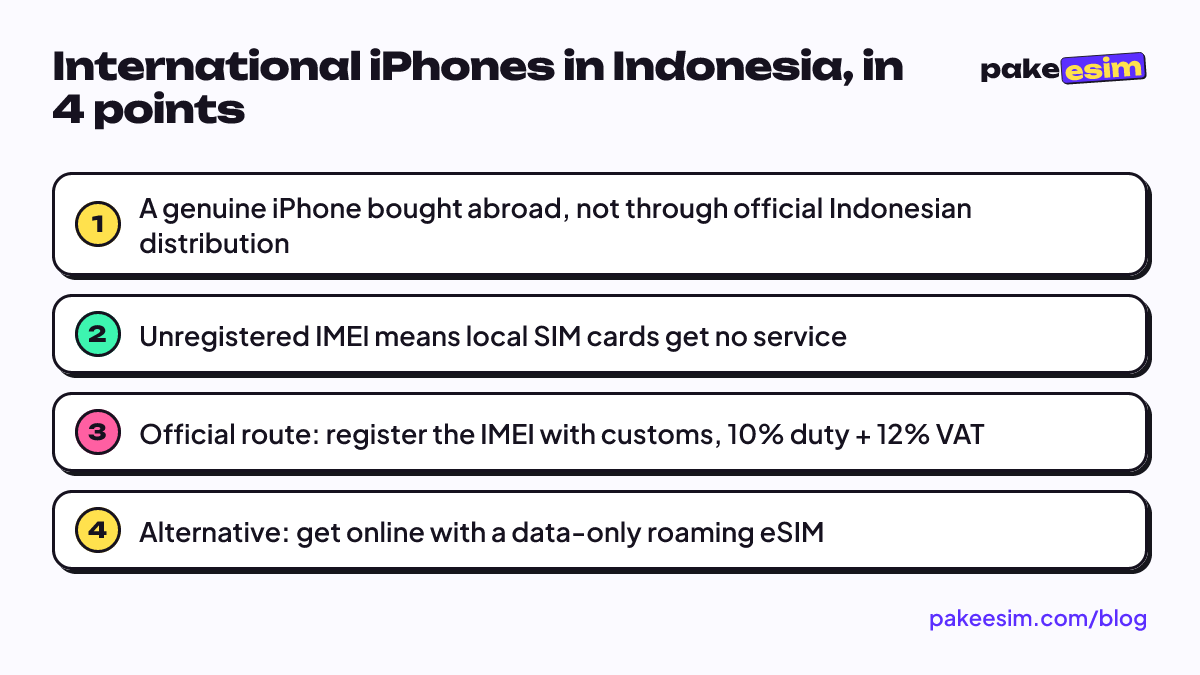
An international iPhone (iPhone inter) is a genuine iPhone bought abroad, not through official Indonesian distribution. It costs less, but until its IMEI is registered, local SIM cards get no signal. Your options: register the IMEI with customs or get online with a roaming eSIM.
Contents
- What is an iPhone inter, and what does inter mean?
- International iPhone vs iBox: what actually changes?
- Why are international iPhones cheaper?
- Seller jargon: what do the ads actually mean?
- All operator or all provider
- Like new
- Registered with customs or IMEI safe
- Will a Telkomsel or Indosat SIM work? IMEI registration in Indonesia explained
- The official route: iPhone IMEI registration with Indonesian customs
- Is an international iPhone safe to buy?
- How do you stay online with a roaming eSIM?
- Check these before you buy
- How many GB do you need?
- IMEI registration, roaming eSIM, or an official unit: which fits?
- Before you pay
An "iPhone inter" is an iPhone bought outside Indonesia, not through an official Indonesian distributor like iBox, and then brought or resold here. It is a genuine Apple device that works exactly like any other iPhone. The difference is paperwork. Without iPhone IMEI registration in Indonesia, a Telkomsel, Indosat, or XL SIM card will get no signal, although Wi-Fi and a roaming eSIM still work. Below we decode the seller jargon, explain why these phones are cheaper, what can go wrong, and which official routes you have.
Key takeaways (TL;DR)
- An iPhone bought abroad without Indonesian IMEI registration gets no signal on Telkomsel, Indosat, or XL SIM cards, though Wi-Fi and roaming eSIM still work.
- Unregistered import duty runs 10% plus 12% VAT on value above the USD 500 personal exemption, per Indonesian Customs IMEI rules as of October 2026.
- US iPhones from the iPhone 14 onward have no physical SIM tray at all, so they rely entirely on eSIM for any cellular connection.
- Ministerial Regulation No. 1 of 2020 exempts inbound roamers using a foreign SIM from IMEI verification, which is why a roaming eSIM works on an unregistered international iPhone.
- A roaming eSIM is data only, with no phone number, calls, SMS, or top-ups, so WhatsApp and calls still run over data.
What is an "iPhone inter," and what does "inter" mean?
"Inter" is short for international. The label grew out of Indonesian buy-and-sell forums and phone shops as a way to separate iPhones that came in through official channels (Apple Indonesia warranty, IMEI already registered) from iPhones bought in another country. They come from all over. Some people carry one home from Singapore or Japan, some get one through a friend studying in the US, and some units are used phones imported in bulk and resold.
So it is not a fake, and it is not a "special edition" either. Same chip, same camera, same iOS, same App Store. You can use it for everything any iPhone does, from photos and online classes to games and banking apps. The one thing that often fails is the cellular connection on Indonesian carriers, and that is a regulation issue, not a hardware one.
You can see which market a unit was made for under Settings > General > About. Tap the model number until a code ending in "/A" shows up; the letters before the slash mark the sales region. Two codes are worth remembering. Many CH/A units (mainland China) and ZA/A units (Hong Kong and Macau) have two physical nano-SIM slots, and some of them cannot install an eSIM at all.
International iPhone vs iBox: what actually changes?
iBox is one of Apple's authorized resellers in Indonesia. A unit bought there, or from another official seller, has gone through certification and its IMEI is already on the official list, so you pop in a SIM and it works. An international unit took a different road, and you feel it in a few places.
| Aspect | iBox / official iPhone | International iPhone |
|---|---|---|
| Origin | Official Indonesian distribution | A store or carrier abroad |
| IMEI | Already registered | Often not registered |
| Local physical SIM | Works right away | No service while the IMEI is unregistered |
| Warranty | Official Indonesian warranty | Usually a store warranty, or none |
| SIM slots | Nano-SIM + eSIM | US units from iPhone 14 on are eSIM-only |
| Price | Official price, taxes included | Cheaper, often with import tax unpaid |
| Condition | New | New, used, or "like new" |
People tend to miss the SIM slot row. According to Apple's support page on SIM trays, iPhone models purchased in the United States have had no SIM tray since the iPhone 14. A US unit from the 14 onward cannot take a physical card at all, whatever its IMEI status. Every cellular connection has to go through eSIM.
Want the full list of which models support eSIM and how safe it is to use? We cover that in our iPhone eSIM compatibility list.
Why are international iPhones cheaper?
There are three main reasons, and none of them means the phone is junk.
- Import tax usually has not been paid. Under the IMEI rules on the Indonesian Customs (Bea Cukai) website, phones brought in by travelers must have their IMEI registered. Personal belongings get a USD 500 exemption, and anything above that is charged 10% import duty plus 12% VAT (as of October 2026). Cheap international units have typically skipped this.
- No official Indonesian warranty. After-sales service is not baked into the price.
- Many are used. Phones that spent a year or two abroad, including ex-carrier-contract units, lose value much faster than new ones.
Prices shift every week with the exchange rate, model, storage, and battery health, so we are not listing numbers here. The more useful figure is the "real price," meaning the unit price plus whatever it costs to make the phone work the way you need, either through IMEI registration or a roaming eSIM.
Seller jargon: what do the ads actually mean?
Listings for international iPhones are full of terms that sound reassuring but can mean different things depending on the seller. Ask directly and ask for proof. Do not trust the label alone.
"All operator" or "all provider"
The original meaning is that the iPhone is not tied to one carrier (carrier unlocked). Many iPhones in the US and Japan are sold on carrier contracts, and while that lock is active the phone only accepts that carrier's SIM. Unlocking is done through the original carrier and is an official process.
The catch is that some sellers use "all operator" to mean "works on every Indonesian carrier." That is about the IMEI, not the carrier lock. So ask two separate questions. Does it show no SIM restrictions? And is the IMEI registered, with what proof?
Apple's guide to carrier locks shows how to check. Open Settings > General > About and look at the Carrier Lock field. If it says "No SIM restrictions," the phone is unlocked.
"Like new"
This means a used unit in near-perfect physical condition. It describes looks, not legal status, and a like-new phone can still have an unregistered IMEI. Check battery health in Settings > Battery and test every feature before you pay.
"Registered with customs" or "IMEI safe"
This is the claim that matters most and needs the most proof. Official registration through Bea Cukai is recorded under the name of the traveler who brought the phone into Indonesia. Ask the seller for the registration record and the tax receipt. If all you hear is "don't worry, it's fine" with no documents, assume the IMEI is not registered and price the phone accordingly.
Will a Telkomsel or Indosat SIM work? IMEI registration in Indonesia explained
Yes, as long as the IMEI is registered. If it is not, any Indonesian SIM card ends up showing "No Service" or the signal simply drops.
The legal basis is Ministerial Regulation No. 1 of 2020, issued by what is now Komdigi (Indonesia's Ministry of Communication and Digital Affairs), on controlling devices through their IMEI. It sets up a central database. Devices whose IMEI is on the list get network service, and unregistered ones are refused by Indonesian carriers. That is the whole answer to "why did my international iPhone lose signal." Nothing is broken; the network is rejecting it.
The same regulation has an important exception. People using a foreign SIM on international roaming (inbound roamers) are exempt from IMEI verification. That is why tourists can use their own phones the moment they land, and it is also how the roaming eSIM in the next section works.
The official route: iPhone IMEI registration with Indonesian customs
The cleanest fix is registering the IMEI. According to Bea Cukai, registration itself is free, but import duty and tax still apply based on the phone's value. The form asks for the traveler's name, ID number, flight number, arrival date, device details, and IMEI. The process is built for travelers' luggage and shipped goods, so it is easiest when you are the one carrying the iPhone in from abroad. Tell the officer on arrival so the USD 500 exemption can be applied.
If you bought the unit from someone else inside Indonesia, things get much harder, because the registration is tied to the arrival details of whoever brought it in. That is exactly why proof from the seller matters so much.
Is an international iPhone safe to buy?
"Safe" usually bundles several worries together, so here they are one by one.
- Is it genuine? An international iPhone is a real iPhone at its core. Check the unit itself, not the label. Match the serial number in Settings with the one on the box, and make sure the previous owner's Apple Account is fully signed out.
- Can it update iOS? Yes. iOS updates come straight from Apple and apply to every iPhone, wherever it was sold. The "don't update or you'll lose signal" warning usually comes from units that got their signal through unofficial means. A phone with a registered IMEI, or one using a roaming eSIM, has no reason to skip updates.
- Does WhatsApp work? Yes, over Wi-Fi or any mobile data, roaming eSIM included. The only snag is the first number verification, since the code arrives by SMS. If the SIM in your international iPhone has no service yet, receive the code on another phone holding that card.
- Is it safe long term? That depends on the IMEI. A unit with an officially registered IMEI is fine for years. A unit with unclear status can lose service at any time, and the buyer carries that risk.
Our honest take: an international unit makes sense if you know from day one that the low price comes with homework. What disappoints people is rarely the iPhone. It is usually a seller promise that cannot be backed up.
How do you stay online with a roaming eSIM?
An eSIM is a digital SIM built into the iPhone. You install a carrier profile by scanning a QR code, with no physical card. A roaming eSIM uses the profile of a foreign carrier that partners with networks in Indonesia, so your iPhone counts as an inbound roamer and skips IMEI verification. An international iPhone that only worked on Wi-Fi can now get online on the street.
This is different from a local eSIM. A Telkomsel, XL, or Indosat eSIM is still a local line, so it still needs a registered IMEI. We compare the options in more detail in the best eSIM for an iPhone in Indonesia.
Check these before you buy
- An iPhone XS, XS Max, XR, or newer (the models Apple lists as eSIM-capable).
- No carrier lock, meaning the phone shows "No SIM restrictions."
- Not a dual nano-SIM CH/A or ZA/A unit.
- An Add eSIM option under Settings > Cellular.
Run through everything on our phone compatibility check page. One thing to be clear about up front. The Pakeesim roaming eSIM is data only. There is no phone number, no regular calls or SMS, and no top-ups. Calls and chats still work through apps like WhatsApp.
How many GB do you need?
Most people with an international iPhone are on Wi-Fi at home, in a boarding house, or on campus, so mobile data is mostly for when they are out. For chat, Maps, ride-hailing apps, and some social media over a month, we think 3 GB is enough if you stick to Wi-Fi when you can. The 1 GB, 7-day plan works as a stopgap while you sort out the IMEI, or for a traveler who just landed. If you video call a lot away from home, size up.
| Plan | Data | Validity | Price | Per day |
|---|---|---|---|---|
| eSIM Indonesia 1 GB / 7 Days | 1 GB | 7 days | Rp30.000 | ±Rp4.286 |
| eSIM Indonesia 2 GB / 15 Days | 2 GB | 15 days | Rp50.000 | ±Rp3.333 |
| eSIM Indonesia 3 GB / 30 Days | 3 GB | 30 days | Rp70.000 | ±Rp2.333 |
| eSIM Indonesia 4 GB / 30 Days | 4 GB | 30 days | Rp110.000 | ±Rp3.667 |
For a month of daily use with Wi-Fi at home, this plan is the most balanced.
A heads-up for readers outside Indonesia: payment is only by Indonesian bank transfer or QRIS, in rupiah, with no card payments. The details are on the payment page. Once your QR code arrives, follow how to install an eSIM on iPhone or the setup guide. Remember to turn on Data Roaming for the eSIM line, because technically you are roaming.
IMEI registration, roaming eSIM, or an official unit: which fits?
Each option has its place. None of them is wrong as long as it matches your needs and budget.
| Your situation | What makes sense |
|---|---|
| Bringing your own iPhone back from abroad | Register the IMEI with customs on arrival |
| Already own an international iPhone, IMEI unregistered | Roaming eSIM for data, WhatsApp over data |
| Need a local number for calls and SMS on the same phone | Get the IMEI registered, or buy an official unit |
| Not bought yet, unsure about the seller's claims | Add unit price + tax or eSIM cost, compare with the official price |
| Tourist or short visit | Roaming eSIM, no SIM queue at the airport |
Before you pay
In short, an international iPhone is a real iPhone with admin work you have to handle yourself. Before you transfer money to a seller, check the model number and region code, check the carrier lock status, ask for proof of IMEI registration, and make sure the old Apple Account is gone. If everything checks out, the price really is attractive.
If the phone is already in your hands and the local SIM still shows no signal, a roaming eSIM can bridge the gap while you decide what to do next. Start with the compatibility check, then pick a plan without rushing.