Imported Phones & IMEI
iPhone SIM Card Not Working in Indonesia? What Should I Do (IMEI, LL/A, CH/A)
Until the IMEI is registered, local SIMs (physical or eSIM) get no signal on an iPhone bought abroad. Wi-Fi and foreign roaming eSIMs still work. Register the IMEI through Bea Cukai and, if the phone isn't carrier-locked, every Indonesian carrier works.

Contents
- Quick answer for each iPhone situation
- Why is a local SIM card not working on an iPhone bought abroad?
- LL/A, CH/A, ZA/A: how many SIMs fit?
- What should I do first? Four checks in five minutes
- What does all operator mean, and is it safe?
- Physical SIM, local eSIM, or roaming eSIM: which one?
- How many GB makes sense?
- Before you buy a SIM
If your iPhone SIM card is not working in Indonesia, the problem is almost always the phone's IMEI, not the card. Until an iPhone bought abroad has its IMEI registered in Indonesia, Telkomsel, Indosat, XL, Tri, or Smartfren SIMs get no signal, local eSIMs included. "What should I do?" Use Wi-Fi or a foreign roaming SIM or eSIM, which keep working. Or register the IMEI through Bea Cukai (Indonesian Customs): if the phone isn't carrier-locked, any Indonesian carrier then works.
Key takeaways (TL;DR)
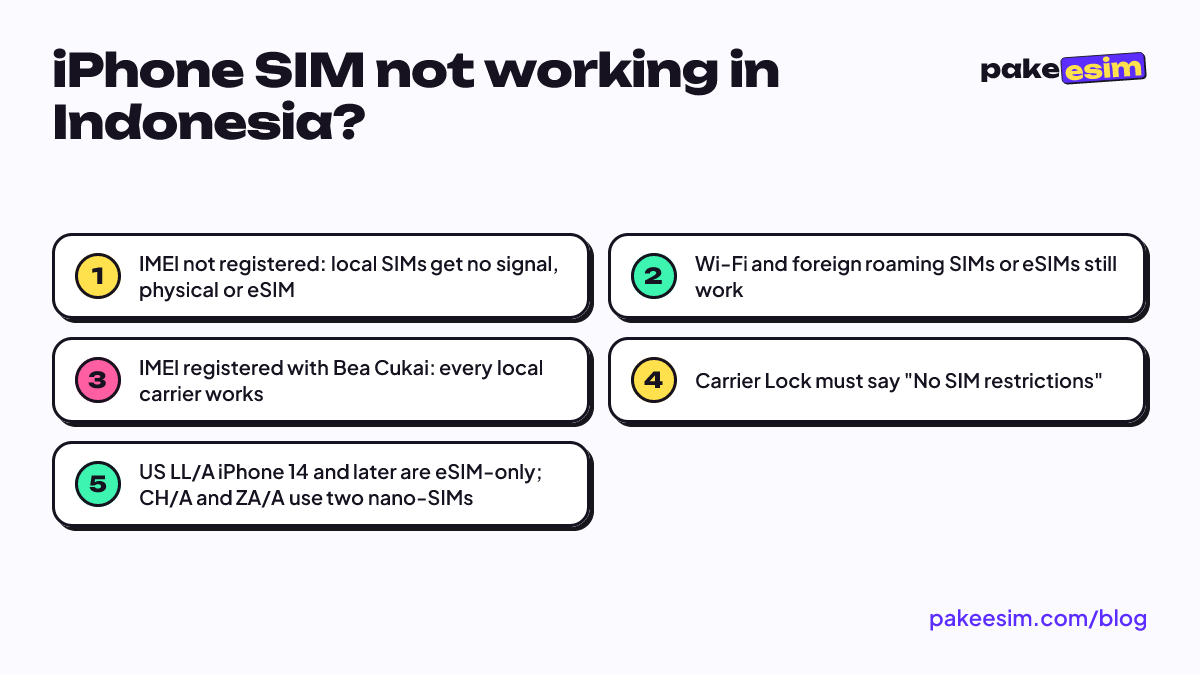
- An iPhone's SIM trouble in Indonesia almost always comes from an unregistered IMEI, not a bad SIM card.
- Until the IMEI is registered, local SIMs and local eSIMs show no signal, while Wi-Fi and foreign roaming SIMs or eSIMs still work.
- A US LL/A iPhone 14 or later is eSIM-only, while CH/A and ZA/A models use two physical nano-SIM slots instead.
- Settings should show Carrier Lock as No SIM restrictions before buying, since a locked iPhone won't accept any local card.
- Registering the IMEI through Bea Cukai makes every Indonesian carrier work, and Komdigi's 2020 regulation exempts roaming SIMs from IMEI checks.
There's a second layer to it. An LL/A iPhone from the US, a CH/A from mainland China, and a ZA/A from Hong Kong have different SIM slots, so "which card" also means "which kind of card".
Quick answer for each iPhone situation
Most of the confusion comes from mixing up two separate things: IMEI status and carrier lock. The IMEI is the phone's 15-digit identity number, and in Indonesia it has to be on an official list before the phone can use local mobile networks. A carrier lock is a different matter. A phone locked to its original carrier only accepts that carrier's cards.
| iPhone situation | Local SIM (physical or eSIM) | Foreign roaming eSIM | Wi-Fi |
|---|---|---|---|
| IMEI not registered, not carrier-locked | No signal | Works, if the model supports eSIM | Works |
| IMEI registered, not carrier-locked | Works with every carrier | Works | Works |
| Still carrier-locked (SIM lock) | Doesn't work | Doesn't work | Works |
| CH/A or ZA/A dual nano-SIM, IMEI not registered | No signal | Usually no eSIM menu | Works |
So when someone asks "will a Telkomsel card work in my iPhone?", the honest answer depends on which row matches the phone. The card itself is fine.
Why is a local SIM card not working on an iPhone bought abroad?
Since Indonesia's IMEI rules took effect, mobile carriers only serve phones whose IMEI is on record. According to Bea Cukai's IMEI page, phones, handhelds, and tablets brought in from abroad as passenger luggage or shipped goods must have their IMEI registered. If they aren't, they don't get Indonesian cellular service.
The block sits on the phone, not the card. Swap Telkomsel for Indosat, then for XL, and you'll get the same empty signal bars because the network checks the IMEI. A local eSIM behaves the same way, since an eSIM from an Indonesian carrier still runs on that same IMEI.
So why does a foreign card work? Ministerial Regulation No. 1 of 2020 from Komdigi (Indonesia's communications ministry) exempts users of foreign SIM cards on international roaming, called inbound roamers, from IMEI verification. That's an official provision, not a loophole, and it's the reason a roaming eSIM still gets you online in Indonesia.
One honest caveat. Sellers also use the label "iPhone inter" (international iPhone) for units whose previous owner already registered the IMEI. Those units take local cards just fine. We cover the difference between international units, official iBox units, and IMEI registration in more depth in our guide to international iPhones in Indonesia, iBox, and IMEI registration.
LL/A, CH/A, ZA/A: how many SIMs fit?
Once the IMEI question is settled, the next one is usually about the card format. The letters at the end of the model number show which market the iPhone was made for, and each market has its own slot layout.
- LL/A (United States). Apple says iPhone 14 and later models bought in the US can only be activated with an eSIM. There's no physical SIM tray at all. LL/A units from iPhone XR to iPhone 13 still have one nano-SIM plus eSIM.
- CH/A (mainland China) and ZA/A (Hong Kong, Macao). Apple notes that some models sold in Hong Kong and Macao use two nano-SIMs, and that only some mainland China models support eSIM. In practice, a CH/A or ZA/A unit usually takes two physical cards but can't install an eSIM.
- Other codes (J/A Japan, B/A UK, X/A Australia, and so on). Usually one nano-SIM plus eSIM, similar to an official Indonesian iPhone. Japanese units deserve a careful carrier lock check.
So the answer to "how many SIMs does my international iPhone take?" can be one physical plus eSIM, two physical, or eSIM only. On iPhones with eSIM, two lines can be active at once; the per-model list is in which iPhone models support dual eSIM.
What should I do first? Four checks in five minutes
Run these before you pay for the phone or buy any card.
- Model code. Go to Settings, General, About, and tap the Model Number row until a code starting with M appears, like MXXXXLL/A. The two or three letters before "/A" are the market code.
- Carrier lock. On the same screen, find Carrier Lock. Per Apple's carrier lock guide, an unlocked iPhone shows "No SIM restrictions". Anything else means it's still locked to its original carrier.
- eSIM support. Dial
*#06#in the Phone app. If an EID appears next to the IMEI, the iPhone has eSIM. Also check for an Add eSIM option under Settings, Cellular. - IMEI status. The simplest test: insert an active local SIM. If it shows no signal while the same card works in another phone, the IMEI very likely isn't registered.
If step 3 leaves you unsure, our eSIM compatibility checker lists the signs of a phone that's ready for eSIM.
What does "all operator" mean, and is it safe?
In Indonesian resale listings, "all operator" means the iPhone is no longer locked to a single carrier, so it accepts cards from any of them. People misread this a lot. "All operator" does not mean the IMEI is registered in Indonesia.
An all-operator international iPhone with an unregistered IMEI still gets no signal on a local card. Only one thing changes: you can use a foreign roaming SIM or eSIM, which a carrier-locked iPhone can't do at all.
On safety, look at how the unit became "all operator". Unlocking through the original carrier is an official process and the status is permanent. A unit that only works with an extra chip stuck into the SIM tray is a different story, since that accessory can stop working after an iOS update. In our view, check for "No SIM restrictions" in Settings before paying. Don't trust the listing label alone.
Physical SIM, local eSIM, or roaming eSIM: which one?
It depends on how long you'll use the phone in Indonesia.
Registering the IMEI with Bea Cukai is the official route if you plan to use the phone for years. Bea Cukai sets the customs-free allowance for regular passengers at USD 500 per person. Above that, import duty and taxes apply. Once registered, every local card works, including Telkomsel, Indosat, or XL eSIMs.
A roaming eSIM suits temporary use. Maybe you just bought an international unit and haven't decided on registration yet, or you're only in Indonesia for a few weeks. You stay online with the roaming eSIM, and WhatsApp runs over data. The limits are clear: data only, no phone number, no regular calls or texts, and it needs an iPhone that supports eSIM. Dual nano-SIM CH/A and ZA/A units are out.
Wi-Fi works on any international iPhone. If you spend most days at home, a boarding house, or a campus with Wi-Fi, you'll need far less mobile data.
A fuller comparison of local eSIM, roaming eSIM, and IMEI registration is in our best eSIM for an iPhone in Indonesia guide.
How many GB makes sense?
As a rough rule, 1 GB covers about a day of maps, chat, and moderate social media. If you have Wi-Fi at home and only use mobile data while out, 2 GB for 15 days is usually enough. For a month with lots of Google Maps and ride-hailing apps, take the 30-day plan with the most data. Plans can't be topped up, so when the data runs out you buy a new QR code.
Indonesia eSIM prices as of October 2026 are in the live table below:
| Plan | Data | Validity | Price | Per day |
|---|---|---|---|---|
| eSIM Indonesia 1 GB / 7 Days | 1 GB | 7 days | Rp17.100 | ±Rp2.443 |
| eSIM Indonesia 2 GB / 15 Days | 2 GB | 15 days | Rp28.500 | ±Rp1.900 |
| eSIM Indonesia 3 GB / 30 Days | 3 GB | 30 days | Rp39.900 | ±Rp1.330 |
| eSIM Indonesia 4 GB / 30 Days | 4 GB | 30 days | Rp33.600 | ±Rp1.120 |
For two weeks of use while you decide whether to register the IMEI, this plan fits best:
If you need a full month and are often away from Wi-Fi, go for 4 GB:
Before you buy a SIM
The order is simple. Check the model code, check for "No SIM restrictions", check for an EID, then decide between IMEI registration and a roaming eSIM. Buying a card before those three are clear often ends with a SIM sitting unused in a drawer.
Once you're sure your iPhone supports eSIM and isn't locked, the setup steps are in our eSIM installation guide and how to install an eSIM on iPhone. One thing to know up front: Pakeesim takes payment online in rupiah, through options like bank virtual accounts, QRIS, e-wallets, or cards. Details are on the payment methods page.