Destinations
Singapore eSIM for Christmas Time: GB, Crowds, Time Zone, and Fixes
A Singapore eSIM works the same at Christmas time as any month. Buy early (validity starts on first connection), take 2 GB or more for 5 to 7 days, and expect slower data in the Marina Bay countdown crowd.

Contents
- How much does a Singapore eSIM cost at Christmas time?
- How many GB do you need for Christmas and New Year s in Singapore?
- Can a Singapore eSIM work in the Christmas time crowds?
- Why is my Singapore eSIM not working at Christmas time?
- Quick fixes in order
- Problems you can t fix on the spot
- What is the Christmas time zone gap between Singapore and Indonesia?
- Can a Singapore eSIM be used in Malaysia or the USA?
- Before you fly
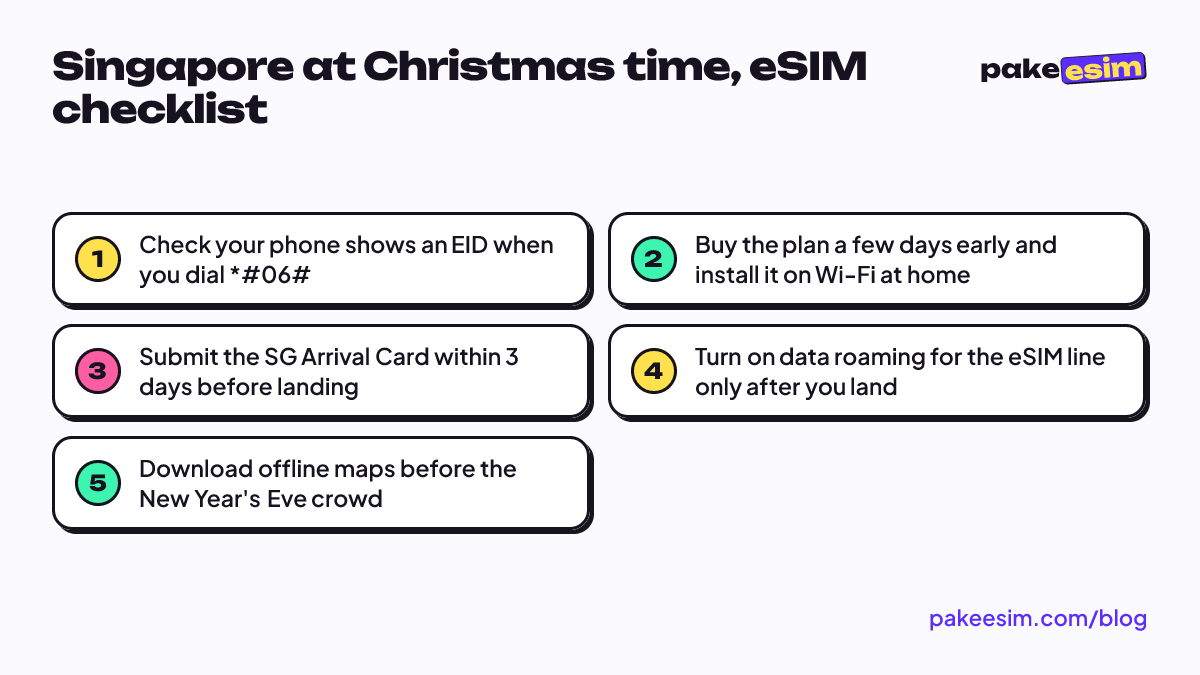
A Singapore eSIM at Christmas time works exactly like it does in any other month. What changes is the trip around it: bigger crowds on Orchard Road and at Marina Bay, afternoon downpours, and two public holidays that turn late December into one long weekend. Buy the plan a few days before you fly, install it on Wi-Fi in Indonesia, and switch it on when you land at Changi. For a typical 5 to 7 day Christmas and New Year's trip, we'd pick 2 GB or more and lean on hotel Wi-Fi for video.
Key takeaways (TL;DR)
- A Singapore data eSIM works the same at Christmas time as in any other month, but crowds at Marina Bay on New Year's Eve can slow mobile data.
- Christmas Day (Friday, 25 December 2026) and New Year's Day (Friday, 1 January 2027) are both public holidays in Singapore, so flights fill early.
- The validity of a Pakeesim eSIM starts when it first connects to a network in Singapore, not on the day you buy it.
- Singapore is one hour ahead of Jakarta (WIB), so the midnight countdown in Singapore happens at 11 pm in Jakarta.
How much does a Singapore eSIM cost at Christmas time?
A Singapore eSIM from Pakeesim starts at Rp30,000 for 1 GB valid 7 days, per October 2026, and the plans go up to 4 GB for 30 days. Prices are in rupiah and read live from the store, so the table below always shows the current figure rather than a number we typed months ago.
| Plan | Data | Validity | Price | Per day |
|---|---|---|---|---|
| eSIM Singapore 1 GB / 7 Days | 1 GB | 7 days | Rp17.100 | ±Rp2.443 |
| eSIM Singapore 2 GB / 15 Days | 2 GB | 15 days | Rp28.500 | ±Rp1.900 |
| eSIM Singapore 3 GB / 30 Days | 3 GB | 30 days | Rp39.900 | ±Rp1.330 |
| eSIM Singapore 4 GB / 30 Days | 4 GB | 30 days | Rp62.700 | ±Rp2.090 |
There is no point waiting until the last week of December to buy. The validity clock only starts once the eSIM first connects to a network in Singapore, so buying in November costs you nothing extra. What it does buy you is time to install it calmly at home instead of fumbling with a QR code at the arrival hall.
One honest note for readers outside Indonesia: prices are in rupiah, and payment is online through Indonesian options like bank virtual accounts, QRIS, GoPay, or ShopeePay, plus credit cards. If none of those work for you, this store won't work for you. The steps are on the payment page.
How many GB do you need for Christmas and New Year's in Singapore?
For a 5 to 7 day Christmas trip, 2 GB is the realistic minimum and 4 GB is the comfortable choice if you post a lot of video. The store's own rule of thumb is that 1 GB covers about one day of maps, chat, and moderate social media, so these plans assume you use hotel or café Wi-Fi for anything heavy.
| Your Christmas trip | What you mostly do | Plan we'd pick |
|---|---|---|
| 2 to 3 days, quick shopping run | Maps, Grab, WhatsApp | 1 GB / 7 days |
| 4 to 6 days, Christmas to New Year's | Maps, MRT routes, Instagram stories | 2 GB / 15 days |
| 7 days or more, family trip | Above plus video calls home | 4 GB / 30 days |
| Long stay, campus or work in January | Daily use alongside office Wi-Fi | 3 GB or 4 GB / 30 days |
Our view: 1 GB is too tight for a week of Christmas lights on Orchard Road if you upload reels every evening. Video eats data faster than anything else on this list. If you share a room with friends, one person can also turn on a hotspot, but remember it draws from the same allowance.
For a longer festive break that runs into the first week of January, the 30 day plans give you room without counting days:
The full breakdown of every Singapore plan, plus setup and fixes for non-holiday trips, is in our Singapore prepaid eSIM guide.
Can a Singapore eSIM work in the Christmas time crowds?
Yes, a Singapore eSIM keeps working in festive crowds, but speeds can drop where tens of thousands of phones share the same cell towers, especially around Marina Bay just before midnight on 31 December. Plan for slow data in that one window rather than for no data at all.
The Urban Redevelopment Authority, which runs the countdown, warned for its last edition that crowd entry around Marina Bay is regulated on New Year's Eve and visitors should expect longer waits at transport nodes. That edition's fireworks started at 11 pm. A few habits help:
- Download the Singapore area in Google Maps for offline use before you leave the hotel.
- Screenshot event tickets, hotel bookings, and your MRT route.
- Agree on a meeting point with your group in case messages lag.
- Keep your phone charged, since searching for signal in a crowd drains the battery quickly.
Rain is the other Christmas time factor. The Meteorological Service Singapore notes that monsoon surges bring widespread moderate to heavy rain, usually from December to early January. That means more time in malls and on the MRT, where Wi-Fi is easy to find, and more checking of the weather radar on mobile data. We wrote more about trip planning in this season in Singapore's monsoon season and a 7-day tourist eSIM.
Why is my Singapore eSIM not working at Christmas time?
A Singapore eSIM that shows no internet after landing is almost always a phone setting, not the holiday season. Check that the eSIM is chosen as your mobile data line and that data roaming is switched on for that line, then toggle airplane mode once to force a fresh network search.
Quick fixes in order
- Settings → Cellular (iPhone) or SIM manager (Android): set the Singapore eSIM as the mobile data line.
- Turn on "Data roaming" for the eSIM line. Your Indonesian SIM can stay with roaming off.
- Turn airplane mode on, wait ten seconds, turn it off.
- Still nothing? Choose a network operator manually from the list instead of automatic.
Problems you can't fix on the spot
An eSIM QR code can usually be scanned only once, so if you deleted the profile, you need a new plan. Phones that are still carrier-locked, and certain dual nano-SIM iPhones with the CH/A or ZA/A model codes, cannot use the eSIM at all. Check this before you buy on the phone eSIM compatibility page. Apple's own wording is plain:
"If your carrier provided you with a QR code, you can use it to set up an eSIM on your iPhone." (Apple Support)
The illustrated iPhone and Android steps live in the eSIM installation guide. Do the install on Wi-Fi in Indonesia, because scanning a QR code without any internet at the airport is much harder.
What is the Christmas time zone gap between Singapore and Indonesia?
Singapore runs on UTC+8, one hour ahead of Jakarta (WIB) and the same as Bali (WITA). So Christmas Eve dinner at 8 pm in Singapore is 7 pm for family in Jakarta, and the New Year's countdown in Singapore hits midnight while Jakarta is still at 11 pm.
This matters for two practical reasons. Video calls home at midnight run on your eSIM data, often in exactly the crowd where speeds dip, so try calling an hour earlier from somewhere calmer. And if automatic time zone is on, your phone should move to Singapore time after landing, so double-check the clock before you read a boarding time.
The holiday calendar matters too. According to Singapore's Ministry of Manpower, Christmas Day falls on Friday, 25 December 2026 and New Year's Day on Friday, 1 January 2027, both public holidays. Two long weekends back to back means busy flights from Jakarta and Surabaya, so book the ticket first and sort the eSIM afterwards.
Can a Singapore eSIM be used in Malaysia or the USA?
No. A Singapore eSIM only works inside Singapore, so it won't connect in Johor Bahru, back in Indonesia, or in the USA. If your Christmas trip includes a day across the causeway to Malaysia, an Asia plan that covers both countries is the simpler choice.
| Your route | Plan type that fits |
|---|---|
| Singapore only | Singapore eSIM |
| Singapore plus Johor Bahru or Kuala Lumpur | Asia eSIM (20 countries, including Singapore and Malaysia) |
| Singapore plus Japan, Korea, or Thailand | Asia eSIM |
| Singapore, then the USA for Christmas | Separate USA eSIM |
The Asia eSIM travel guide lists all 20 countries. For a US leg over the holidays, see our USA eSIM guide for Christmas time and New Year's.
Before you fly
The ICA requires foreign visitors to submit the SG Arrival Card within three days before arrival, free of charge, through the SGAC e-Service or the MyICA app. Do it on home Wi-Fi together with the eSIM install, so both are sorted before the airport.
Unpaid orders expire after 3 hours, and support replies in Indonesian from 08.00 to 22.00 WIB, so don't leave the purchase for the night before your flight. Once that's done, the rest of the trip is Christmas lights, chili crab, and a spot by the Bay that's hopefully not under the rain.