Destinations
Singapore eSIM Prepaid 2026: Plans, How Many GB, Setup, and Fixes
A Singapore eSIM prepaid plan is a data-only package you install at home and switch on at Changi. No passport registration, no SIM counter, and your home number keeps working. Here are the plans, data sizing, setup steps, and fixes.

Contents
- What is a Singapore eSIM, and is eSIM available in Singapore?
- How much does a Singapore eSIM cost?
- How many GB do you need for Singapore: 1 day, 7 days, or 30 days?
- Singapore eSIM, local tourist SIM, or roaming: which one?
- How to get an eSIM for Singapore and activate it before you fly
- Check your phone first
- Buy and install
- At Changi
- Can a Singapore eSIM be used in Malaysia or China?
- Why is my Singapore eSIM not working?
- Before you fly to Singapore
A Singapore eSIM prepaid plan is a data-only package you install from a QR code before you leave, and it starts counting days once your phone connects to a network in Singapore. You skip the SIM counter at Changi, you don't register a passport with a local carrier, and your home number stays on the phone for WhatsApp and bank codes. The trade-off is simple: you get mobile data, not a Singapore phone number. You need a phone that supports eSIM and isn't carrier-locked, and that's about it.
Key takeaways (TL;DR)
- A Singapore prepaid eSIM from Pakeesim is data only, with no Singapore phone number, SMS, or regular calls, and it comes in four sizes from 1 GB for 7 days to 4 GB for 30 days.
- The validity of a Singapore eSIM starts when it first connects to a network in Singapore, not on the day you buy the QR code.
- As of October 2026, M1 states that local SIM cards registered with a foreign passport expire after 30 days and each person can register at most 3 prepaid or tourist SIMs across all operators.
- A Singapore eSIM plan only works inside Singapore; a trip that also covers Malaysia or China needs the Asia eSIM, which covers 20 countries.
- Payment is online by QRIS, e-wallet, virtual account, or card, in rupiah, with no admin fee, and the order confirms automatically once paid.
What is a Singapore eSIM, and is eSIM available in Singapore?
A Singapore eSIM is a digital SIM profile that gives your phone mobile data on Singapore networks, without a plastic card. Yes, eSIM is available in Singapore: local carriers such as Singtel and M1 sell eSIM plans, and travel eSIMs bought abroad connect to local networks as roaming lines.
Apple defines the technology plainly:
"An eSIM is an industry-standard digital SIM built into your iPhone, eliminating the need for a physical SIM card." (Apple Support on eSIM for iPhone)
Four things about a Singapore prepaid eSIM tend to surprise people:
- Data only. There's no Singapore number. You can't receive an SMS from a local bank or take a call to a +65 number. WhatsApp, Telegram, and FaceTime calls still work over data.
- Prepaid, no contract. You pay once. No monthly bill, no top-up. When the data runs out, you buy a new QR.
- It shows up as roaming. Seeing a Singapore carrier name and an "R" or roaming icon is normal. That's how the plan connects.
- Your home SIM keeps working. The eSIM sits beside your main SIM, so one-time codes from your Indonesian bank still arrive if that line is active.
If you just want the short version for a week-long holiday, our 7-day Singapore tourist eSIM guide is quicker. The sections below go deeper: price, data needs, local SIM rules, Malaysia and China routes, and fixes.
How much does a Singapore eSIM cost?
A Singapore eSIM prepaid plan from Pakeesim comes in four sizes, from 1 GB for 7 days up to 4 GB for 30 days, priced in Indonesian rupiah (IDR). The table below pulls live prices from the catalog, so it matches checkout.
| Plan | Data | Validity | Price | Per day |
|---|---|---|---|---|
| eSIM Singapore 1 GB / 7 Days | 1 GB | 7 days | Rp17.100 | ±Rp2.443 |
| eSIM Singapore 2 GB / 15 Days | 2 GB | 15 days | Rp28.500 | ±Rp1.900 |
| eSIM Singapore 3 GB / 30 Days | 3 GB | 30 days | Rp39.900 | ±Rp1.330 |
| eSIM Singapore 4 GB / 30 Days | 4 GB | 30 days | Rp62.700 | ±Rp2.090 |
The cheapest price per day sits on a 30-day plan, because the validity is long. That's only a saving if you actually stay that long. For a three-day work trip to Marina Bay, paying for 27 unused days makes no sense.
There's no shipping or admin fee, since nothing physical is sent. You pay exactly the plan price, with no extra code needed. Payment is online through Midtrans: bank virtual accounts, QRIS, GoPay, ShopeePay, convenience stores, or credit card, all in rupiah, and the order is confirmed automatically once paid. The full steps are on the payment page.
How many GB do you need for Singapore: 1 day, 7 days, or 30 days?
For a short stay of 1 to 4 days, 1 GB is usually enough because Singapore hotels, malls, and MRT stations are full of Wi-Fi. A full week is more comfortable on 2 GB, and a month of study, an internship, or a long conference trip is better on 3 or 4 GB.
Our store's rough rule is about 1 GB for one day of mixed use: maps, chat, and a fair amount of social media. In Singapore you'll often use less than that, since you're rarely far from free Wi-Fi. Then again, scrolling Instagram on a 40-minute MRT ride from Changi to Jurong adds up.
| Trip | Typical use | Sensible plan |
|---|---|---|
| Layover or 1-day transit at Changi | Maps, Grab, WhatsApp | 1 GB / 7 days |
| 3 to 7 days, Marina Bay, Sentosa, Orchard | Maps, chat, daily photo uploads | 2 GB / 15 days |
| 2 to 4 weeks, campus visit or short course | Daily use, some video calls | 3 GB / 30 days |
| A month with frequent laptop hotspot | Heavy use, tethering | 4 GB / 30 days |
In our view, 1 GB for a full 7 days is tight if you share your hotspot or upload Reels every night from Gardens by the Bay. For a family, it's usually better for each person to install their own eSIM than to run four phones off one hotspot.
For students and anyone staying a month, the bigger 30-day plan avoids buying a second QR halfway through:
Singapore eSIM, local tourist SIM, or roaming: which one?
A travel eSIM is the simplest choice if you only need data. A local Singapore tourist SIM makes sense if you truly need a +65 number for calls or local SMS. Roaming from your Indonesian carrier keeps your own number working abroad, but you pay for that convenience.
The local SIM route has rules many travelers don't expect. Singapore carriers register every prepaid SIM to an identity document, and for visitors that means a passport. M1's support page states that SIM cards registered with a foreign passport expire after 30 days and each person can register at most 3 prepaid or tourist SIMs regardless of operator, as of October 2026. For a short holiday that's fine; for a 6-week internship it isn't.
| Travel eSIM (data only) | Local tourist SIM | Roaming from Indonesia | |
|---|---|---|---|
| Phone number | No, keeps your home number on the main SIM | Yes, a +65 number | Yes, your own number |
| Passport registration | No | Yes, with the carrier | No |
| Ready when you land | Yes, installed at home | After buying and registering | Yes, if roaming is enabled |
| Calls and SMS | Through apps only | Yes | Yes, at roaming rates |
| Validity limit | Plan validity (7 to 30 days) | 30 days on a passport | Depends on the roaming package |
So, which one? For most visitors from Indonesia, a data eSIM plus your Indonesian number for OTP codes covers everything. If you search for a "Singapore eSIM with phone number", that's a local carrier product, not a travel data eSIM.
How to get an eSIM for Singapore and activate it before you fly
You can buy a Singapore eSIM online from Indonesia, install it at home, and let it activate overseas. The plan doesn't start counting days until your phone first connects to a Singapore network, so buying a few days early costs you nothing.
Check your phone first
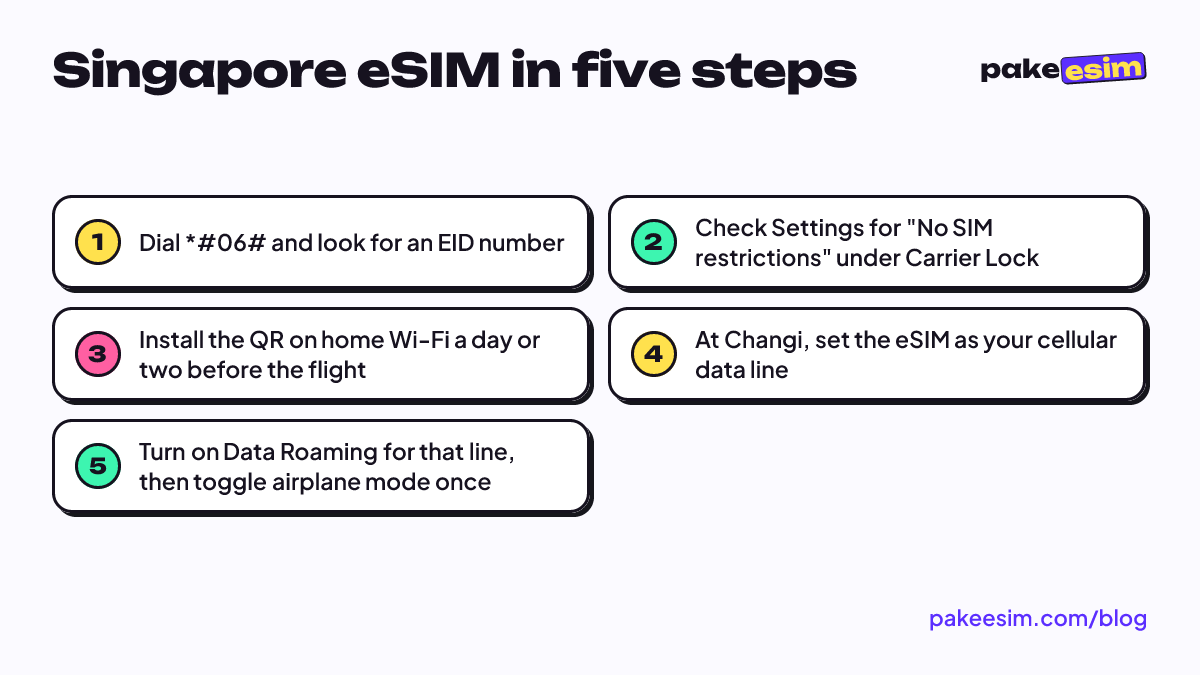
Dial *#06#. If you see an EID, the phone has eSIM hardware. Then check the carrier lock: on an iPhone, Apple says to open Settings, then General, then About, and look for "No SIM restrictions" next to Carrier Lock. A locked phone can't use another provider's eSIM, and only the original carrier can unlock it. Some dual nano-SIM iPhones (CH/A and ZA/A models) aren't supported at all. The phone compatibility checker lists more models.
Buy and install
- Choose a plan from the Singapore table above and check out.
- Pay on the Midtrans payment page: bank virtual accounts, QRIS, GoPay, ShopeePay, convenience stores, or credit card. The order confirms automatically, no receipt upload.
- The eSIM QR code appears on your order page and is emailed to you.
- On home Wi-Fi, scan the QR in Settings → Cellular (iPhone) or Settings → Connections → SIM manager (Samsung).
- Leave the new line's Data Roaming off until you land.
Support runs from 08:00 to 22:00 WIB, so don't wait until 2 a.m. before a 6 a.m. flight out of Soekarno-Hatta. The step-by-step screenshots are in the eSIM installation guide, and iPhone owners can follow how to install an eSIM on iPhone.
At Changi
Switch cellular data to the eSIM line, turn on Data Roaming for that line, and keep your Indonesian SIM on for calls and texts if you want OTP codes. Toggle airplane mode on and off once to force a network search.
Can a Singapore eSIM be used in Malaysia or China?
No. A Singapore eSIM plan only connects inside Singapore, so it stops working once you cross the Causeway into Johor Bahru or land in Shanghai. The same applies to the US or anywhere else: "Singapore eSIM not working in USA" usually just means the plan has no coverage there.
For a route like Singapore plus Johor Bahru, Kuala Lumpur, or Bangkok, look at the Asia eSIM plans. One profile covers 20 countries, including Singapore, Malaysia, Thailand, Vietnam, and China, so you don't swap QR codes at each border. The Asia eSIM travel guide breaks down which countries fit which plan.
China has extra quirks around apps and VPNs, which the China eSIM guide for tourists covers. If Malaysia is your main stop and Singapore is a day trip, the Malaysia eSIM tourist guide explains the reverse route.
Why is my Singapore eSIM not working?
A Singapore eSIM that won't connect is almost always a settings issue: the eSIM isn't set as the cellular data line, Data Roaming is off on that line, or the phone hasn't searched for a network yet. Check those three in order before anything else.
- No signal at all. Turn airplane mode on for ten seconds, then off. If that fails, go to network selection, turn off Automatic, and pick a Singapore carrier from the list.
- Signal but no internet. Make sure Cellular Data points to the eSIM line, not your Indonesian SIM, and that Data Roaming is on for the eSIM.
- Installed but "No Service" before you fly. That's normal. The plan only connects in Singapore.
- Data ran out. Singapore eSIM plans can't be topped up. Buy a new plan and install the new QR.
- Deleted the eSIM by accident. A QR code usually works only once, so don't delete the profile while you're still traveling.
If none of that helps, contact support with your order number. Since every order is handled by staff, they can see its status right away.
Before you fly to Singapore
A Singapore eSIM prepaid plan suits most short visits: install it at home, switch it on at Changi, and keep your Indonesian number for bank codes. For a weekend, 1 GB is enough; for a week, 2 GB feels comfortable; for a month, pick a 30-day plan. If you need a local +65 number, that's a carrier SIM with passport registration and a 30-day limit, not a travel eSIM. Check your phone, compare the live prices above, and pick the size that matches your trip.