Destinations
Thailand eSIM vs Physical SIM Card: Which Is Easier for Tourists?
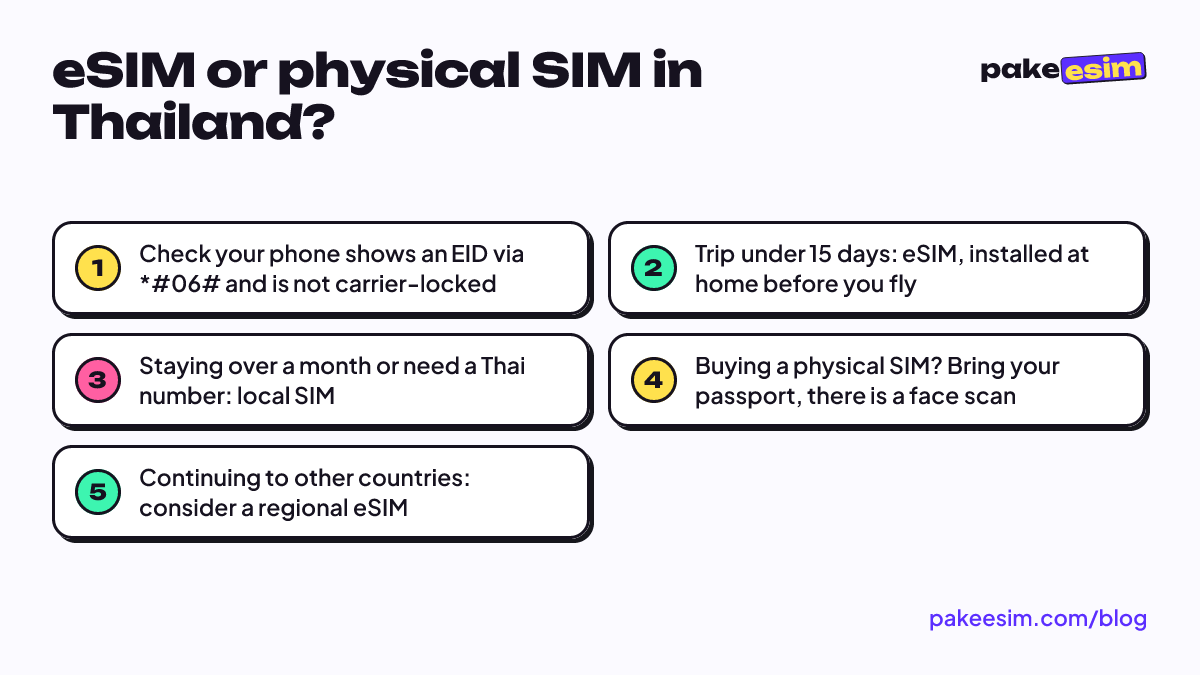
For a Thailand trip under two weeks, an eSIM is easier: install it at home, get online the moment you land, and keep your home number active. A local physical SIM suits long stays or anyone who needs a Thai number, but it requires passport registration and a face scan at the counter.

Contents
- Thailand eSIM vs physical SIM card: what s the difference?
- Is a Thailand eSIM the same as a physical SIM card?
- Rules for buying a physical SIM card in Thailand in 2026
- Which one fits your trip: Thailand eSIM or local SIM?
- Pick a Thailand eSIM if
- Pick a Thai local SIM if
- How many GB of Thailand eSIM data do you need?
- Can I switch from a physical SIM to an eSIM in Thailand?
- When your route continues to other countries, including the UAE
- So, which one should you pick?
For a Thailand trip of 3 to 15 days, an eSIM is usually easier than a physical SIM card: you install it at home with a QR code, get online the moment you land, and your home number stays active. A physical SIM card (a local Thai SIM) makes sense if you are staying a long time, need a lot of data, or want a Thai number for calls and SMS. This Thailand eSIM vs physical SIM card comparison uses the Thai SIM registration rules in force as of October 2026, so you can decide before the flight, not at the airport counter.
Key takeaways (TL;DR)
- A Thailand eSIM is installed by QR code before departure and activates when it connects to a network in Thailand, with no counter queue.
- Buying a physical SIM in Thailand requires a passport and a face scan matched against the passport photo.
- Since May 16, 2026, foreigners are limited to three SIMs per Thai operator, and registration must happen in person at an official shop or dealer.
- A Thailand travel eSIM is data only, while a local Thai SIM can come with a number for calls and SMS.
- Thailand eSIM plans cannot be topped up, while local Thai SIM cards can be topped up at 7-Eleven.
Thailand eSIM vs physical SIM card: what's the difference?
An eSIM is a digital SIM built into your phone, so you add a mobile plan by scanning a QR code instead of inserting a card. A physical SIM card is the regular nano-SIM you buy in Thailand from a local operator and slide into the SIM tray.
The difference goes beyond the format. What you notice most is when and where you deal with it.
- A Thailand eSIM is bought online before you leave, installed over your home Wi-Fi, and switches on by itself once your phone connects to a network in Thailand.
- A Thai physical SIM is bought after landing, at an airport counter or operator shop, with passport registration on the spot.
- On phone numbers, a travel eSIM is data only, while a local SIM usually gives you a Thai number.
- Your home SIM stays in place if you use an eSIM. With a physical SIM, a single-slot phone means taking your home card out.
Apple's own definition keeps it short.
"An eSIM is an industry-standard digital SIM built into your iPhone, eliminating the need for a physical SIM card." (Apple Support guide to setting up eSIM on iPhone)
Because an eSIM and a physical card can be active together, Apple also lists adding a local data plan when you travel as one of the uses of Dual SIM.
Is a Thailand eSIM the same as a physical SIM card?
A Thailand eSIM and a physical SIM card both give you mobile internet in Thailand, but how you buy, register, top up, and get a number is different. A travel eSIM is sorted out before departure and covers data only, while a local SIM is sorted out in Thailand with your passport and usually includes a local number.
| Aspect | Thailand travel eSIM | Physical SIM / Thai local SIM |
|---|---|---|
| Where to buy | Online, before the trip | Airport counter, operator shop, official outlet |
| Registration | No counter queue | Passport and face scan, in person |
| When you're online | As soon as you land and turn on Data Roaming | After the queue and registration |
| Thai number | None, data only | Usually included |
| Home SIM | Stays active next to the eSIM | Removed on single-slot phones |
| Top-up | Not possible, buy a new plan | Possible, including at 7-Eleven |
| Payment | Rupiah, paid online by QRIS, e-wallet, VA, or card | Thai baht, in Thailand |
| Phone requirement | eSIM support, not carrier-locked | Not carrier-locked |
Thailand's tourism authority lists three main mobile operators in Thailand: AIS, DTAC, and TrueMove H, and notes that SIM purchases are registered to the user's name and passport number. Local SIMs can be topped up at 7-Eleven, operator shops, or top-up machines. So if you searched "thailand esim 7-eleven", 7-Eleven is where you recharge a local SIM, not where you install a travel eSIM.
Rules for buying a physical SIM card in Thailand in 2026
Every physical SIM in Thailand must be registered with a passport, and since 2018 foreign buyers also go through a face scan matched against their passport photo. The rule applies to all operators, including tourist SIMs sold at the airport.
Pattaya Mail's report on biometric checks now required for Thailand SIM card purchases explains that a foreigner's face is matched against the photo in their passport. It's quick when the counter is quiet. Land at Suvarnabhumi at the same time as a few other flights, though, and the SIM line can be longer than immigration.
Registration rules have also tightened. Tilleke & Gibbins' summary of Thailand's telecom registration notification effective May 16, 2026 lists four points that matter.
- Foreigners verify their identity mainly with a passport.
- Registration must happen in person at an official shop or dealer.
- Foreigners can hold a maximum of three SIMs per person per operator.
- A registered SIM must be activated within 60 days, or it needs re-verification.
For a regular tourist, the three-SIM cap rarely matters. What you will feel is having to show up at a counter with your passport, which you can't do from home.
Which one fits your trip: Thailand eSIM or local SIM?
A Thailand eSIM fits short to medium trips best, while a Thai local SIM fits long stays or anyone who needs a Thai number. The simple test: if your data needs fit a 1 to 4 GB plan and you don't need to receive Thai SMS, the eSIM saves you time.
Pick a Thailand eSIM if
- You're spending 3 to 15 days in Bangkok, Chiang Mai, Phuket, or Pattaya, with hotel Wi-Fi for streaming.
- You land late and don't want a counter queue, say a flight arriving at Don Mueang after 11 p.m.
- You need your home number active for bank OTP codes and WhatsApp.
- Your phone has only one SIM tray.
Pick a Thai local SIM if
- You're staying more than a month, for an internship or study.
- You need a Thai number for ride-hailing, food delivery, or contact with a campus.
- You watch hours of video on mobile data rather than Wi-Fi.
- Your phone doesn't support eSIM.
In our view, a local SIM often looks cheaper per GB, but you pay for the whole bundle even if you only use half. For 5 days in Bangkok with hotel Wi-Fi, that big bundle mostly sits there unused.
How many GB of Thailand eSIM data do you need?
As a store rule of thumb, 1 GB covers roughly one day of maps, chat, and moderate social media in Thailand. If you video call or stream over mobile data a lot, plan for double. A 7-day trip with plenty of hotel Wi-Fi usually works fine on 2 GB.
Thailand eSIM plans are priced in Indonesian rupiah and paid online by QRIS, e-wallet, bank virtual account, or card. If none of these payment options work for you, a local SIM bought in Thailand may simply be the more practical route.
Prices in this table are pulled live from the catalog and may change:
| Plan | Data | Validity | Price | Per day |
|---|---|---|---|---|
| eSIM Thailand 1 GB / 7 Days | 1 GB | 7 days | Rp17.100 | ±Rp2.443 |
| eSIM Thailand 2 GB / 15 Days | 2 GB | 15 days | Rp28.500 | ±Rp1.900 |
| eSIM Thailand 3 GB / 30 Days | 3 GB | 30 days | Rp39.900 | ±Rp1.330 |
| eSIM Thailand 4 GB / 30 Days | 4 GB | 30 days | Rp62.700 | ±Rp2.090 |
The rough math looks like this. The 1 GB / 7-day plan fits 3 to 4 days spent mostly on Wi-Fi. The 2 GB / 15-day plan suits a week of Grab, Google Maps, and the occasional photo upload.
For 10 to 14 days, especially if you move from Bangkok to Chiang Mai and then Phuket, 4 GB for 30 days is the safer pick. eSIM plans can't be topped up, so a little spare data beats buying a second plan mid-trip.
Traveling in the busy year-end season? See our breakdown of Thailand eSIM data needs in December vs April and the Thailand eSIM guide with data per day for tourists.
Can I switch from a physical SIM to an eSIM in Thailand?
Yes, as long as your phone supports eSIM and isn't carrier-locked. You don't have to remove your home SIM, because the Thailand eSIM is added as a second line and then chosen as your cellular data line. Your physical home SIM keeps receiving calls and SMS.
The short version takes four steps.
- Check compatibility on our page for checking whether your phone supports eSIM. The phone needs an EID (dial *#06#) and an Add eSIM menu.
- Make sure the phone isn't carrier-locked. Apple explains how to check and how only your original carrier can unlock it in its official guide to carrier-locked iPhones.
- Scan the QR code while still on home Wi-Fi, following the eSIM installation guide for iPhone and Android.
- After landing, set the eSIM as Cellular Data and turn on Data Roaming for that eSIM line.
One honest caveat. Certain dual nano-SIM iPhones with model codes CH/A and ZA/A don't support eSIM. If yours is one of them, a Thai physical SIM is the realistic choice.
When your route continues to other countries, including the UAE
A Thai local SIM and a Thailand eSIM are both built for use in Thailand. If you transit through or continue on to the United Arab Emirates, neither should be your main line in Dubai, so set up a separate UAE eSIM plan or a regional one.
For a Southeast Asia loop like Bangkok, then Kuala Lumpur or Ho Chi Minh City, one Asia eSIM covering 20 countries can replace two or three local SIMs. Details are in our Asia eSIM guide covering 20 countries. How an eSIM hops between networks across borders is explained in what a travel eSIM is and how it works.
So, which one should you pick?
For most travelers visiting Thailand for under two weeks, an eSIM makes more sense: no counter queue, no face scan, and your home number stays alive. A local SIM is still worth it for long stays, very heavy data use, or when you need a Thai number.
If the eSIM sounds right, check your phone first, pick a plan from the table above, and pay by QRIS, e-wallet, bank transfer, or card in rupiah. Install the QR the night before you fly, and the rest is just mango sticky rice.