Destinations
eSIM for Malaysia and Indonesia: Does a Malaysia eSIM Work at Home?
No. A Malaysia eSIM only gets signal in Malaysia, not in Indonesia. Use an Indonesia eSIM at home, and an Asia eSIM if your route adds Singapore or Thailand.

Contents
- Can I use a Malaysia eSIM in Indonesia?
- Why doesn t a Malaysia eSIM work in Indonesia?
- Country coverage is locked per plan
- Validity doesn t tick while you re still in Indonesia
- Still no signal after landing in Malaysia
- Which eSIM covers Malaysia, Indonesia, and nearby countries?
- Malaysian carrier eSIM or a phone from Malaysia: which one do you mean?
- An eSIM with a number from a Malaysian carrier
- A phone bought in Malaysia and used in Indonesia
- One rule that applies to all of them
- Can I use a Malaysia eSIM without an app or a credit card?
- Which Malaysia eSIM plan should I get?
- Before you fly to Malaysia
Looking for one eSIM for Malaysia and Indonesia? A Malaysia travel eSIM won't do both: it only gets signal on Malaysian networks, so in Jakarta, Medan, or Batam the profile sits on your phone with no data. For internet in Indonesia you need an Indonesia eSIM, which makes Malaysia plus Indonesia a two-plan trip. The upside is that you can install the Malaysia eSIM at home, because its validity only starts once it connects to a network in Malaysia.
Key takeaways (TL;DR)
- A Malaysia eSIM plan only gets signal in Malaysia, not in Indonesia, even when the profile is installed and visible in your phone's Settings.
- You can install a Malaysia eSIM over Wi-Fi while still in Indonesia, because its validity only starts when it first connects to a network in Malaysia.
- Internet inside Indonesia needs an Indonesia eSIM, and a route covering Malaysia plus Singapore or Thailand fits the Asia eSIM, which covers 20 countries but not Indonesia.
- The Pakeesim Malaysia eSIM installs from a QR code in your phone's Settings with no extra app, and is paid online in rupiah through Midtrans (QRIS, e-wallet, bank virtual account, or card).
Can I use a Malaysia eSIM in Indonesia?
No. The Malaysia eSIM is built for Malaysia only, from Kuala Lumpur and Penang down to Johor Bahru, so in Indonesia the profile finds no network willing to accept it. The line still shows up on your phone, just with no signal and no data.
People often assume the Malaysia eSIM is "working" because the line looks active right after the QR scan. That status only means the profile is saved on the phone. Data starts flowing once you're physically in Malaysia and the phone latches onto a partner network there.
So don't buy a Malaysia eSIM for everyday use at home, even if the price looks just as cheap. If you need data inside Indonesia, say on an iPhone bought abroad whose IMEI isn't registered yet, the catalog has an Indonesia eSIM with 2 GB for 15 days that runs as a roaming line on Indonesian networks.
Why doesn't a Malaysia eSIM work in Indonesia?
A Malaysia eSIM doesn't work in Indonesia because the plan's coverage is Malaysia, full stop. It isn't a temporary outage or a phone problem. Every travel eSIM profile may only connect to partner operators in the countries listed on its plan, and Indonesia is not on the Malaysia plan's list.
Country coverage is locked per plan
The Malaysia plan covers one country. The Asia eSIM covers 20 countries, including Malaysia, Singapore, Brunei, and Thailand, and the Global eSIM covers 88. Indonesia is in none of the three, because Indonesia has its own plan. Once the phone is outside the plan's country list, local networks reject the connection.
Validity doesn't tick while you're still in Indonesia
The good news: Malaysia eSIM validity starts the first time it connects to a network in Malaysia, not when you buy or scan it. A 7-day plan stays a full 7 days even if you install it three days before flying out of Soekarno-Hatta or Kualanamu. The setup steps are in the guide to installing and activating an eSIM.
Still no signal after landing in Malaysia
If the Malaysia eSIM has no service even after you land, check three things in order. Make sure the eSIM is selected for cellular data, Data Roaming is switched on for the eSIM line, then toggle airplane mode on and off once. Still nothing? Pick the network operator manually. More on-the-ground issues are covered in our Malaysia eSIM guide to prices, data per city, and what to do if it fails.
Which eSIM covers Malaysia, Indonesia, and nearby countries?
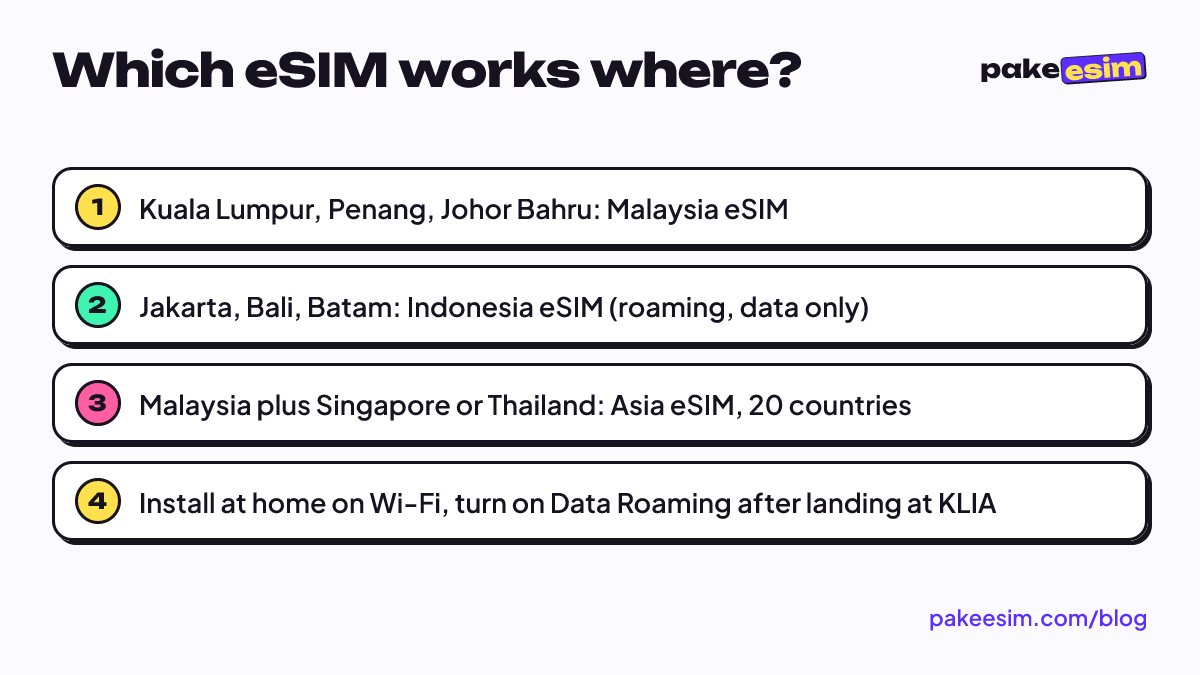
No single travel eSIM in the catalog covers both Malaysia and Indonesia, so a trip through both needs the plan whose country list matches each leg. For Indonesia to Malaysia and back, a Malaysia eSIM is enough. If your route also crosses into Singapore or Thailand, the Asia eSIM makes more sense.
| eSIM plan | Malaysia | Singapore & Thailand | Indonesia | Notes |
|---|---|---|---|---|
| Malaysia eSIM | Yes | No | No | Cheapest for one country |
| Singapore eSIM | No | Singapore only | No | Stops working once you cross to Johor Bahru |
| Asia eSIM (20 countries) | Yes | Yes | No | One profile for a cross-border route |
| Global eSIM (88 countries) | Yes | Yes | No | For trips across continents |
| Indonesia eSIM | No | No | Yes | Roaming data for use inside Indonesia |
A common route: fly into Kuala Lumpur, take a bus to Johor Bahru, then cross to Singapore at Woodlands. The Malaysia plan stops working on the Singapore side, so for a trip like that we'd point you to the Asia eSIM that covers 20 countries.
The same question comes up for other countries, and the answer is the same. A travel plan only lives in the region printed on it, whether it's a Saudi eSIM brought back to Indonesia or a China eSIM used in Indonesia or Hong Kong.
Malaysian carrier eSIM or a phone from Malaysia: which one do you mean?
"Malaysia eSIM" sometimes doesn't mean a travel plan at all. It can mean an eSIM with a number from a Malaysian carrier, or a phone bought in Malaysia. Each has a different answer.
An eSIM with a number from a Malaysian carrier
An eSIM with a number from a Malaysian carrier can only get data in Indonesia if its international roaming is on and that carrier offers a roaming plan for Indonesia. Rates and terms are up to the carrier, so check with them before you go. On the Indonesian side, Ministerial Regulation No. 1 of 2020, Article 3(5), issued by Komdigi (Indonesia's communications ministry), exempts foreign SIM users on international roaming (inbound roamers) from IMEI verification.
A phone bought in Malaysia and used in Indonesia
A phone bought in Malaysia and used back home with a Telkomsel, XL, or Indosat SIM must have its IMEI registered. Per the Indonesian Customs (Bea Cukai) IMEI rules, as of October 2026 a passenger's personal goods get a USD 500 deduction on customs value, and the rest is charged 10% import duty and 12% VAT. Until the IMEI is registered, you can still use Wi-Fi or stay online with a roaming eSIM. The SIM options are covered in why an iPhone SIM card isn't working in Indonesia.
One rule that applies to all of them
The phone must support eSIM and must not be carrier-locked. Used phones from abroad are sometimes still locked to one carrier, and a locked phone can't install an eSIM from another provider. Only the original carrier can lift that lock, not Apple:
"Apple can't unlock your iPhone for use with a different carrier." (Apple Support on iPhone carrier locks)
How to check your EID and lock status is on the eSIM phone compatibility page.
Can I use a Malaysia eSIM without an app or a credit card?
Yes. The Pakeesim Malaysia eSIM installs by scanning a QR code straight from your phone's Settings, with no app to download. Payment is online in rupiah through Midtrans (QRIS, e-wallet, bank virtual account, or card), and the order is confirmed automatically once paid.
QR installation is the standard route, as described in Apple's official guide to setting up eSIM on iPhone. On Android the menu is usually called Add eSIM or Download SIM. The flow is short:
- Pick a plan, check out, and pay online (QRIS, e-wallet, bank virtual account, or card); the order is confirmed automatically once paid, and the QR code appears on your order page and arrives by email.
- Scan the QR while you're still on Wi-Fi at home.
- After landing in Malaysia, select the eSIM for data and turn on Data Roaming.
Payment details are on the how to pay page. Unpaid orders expire after 3 hours, so if you miss the window, just place a new order.
Which Malaysia eSIM plan should I get?
The right Malaysia eSIM plan depends on trip length and how often you open maps. A simple rule: 1 GB covers roughly one day of maps, chat, and light social media. If you video call or stream a lot, double it. Current prices are in this table.
| Plan | Data | Validity | Price | Per day |
|---|---|---|---|---|
| eSIM Malaysia 1 GB / 7 Days | 1 GB | 7 days | Rp17.100 | ±Rp2.443 |
| eSIM Malaysia 2 GB / 15 Days | 2 GB | 15 days | Rp28.500 | ±Rp1.900 |
| eSIM Malaysia 3 GB / 30 Days | 3 GB | 30 days | Rp39.900 | ±Rp1.330 |
| eSIM Malaysia 4 GB / 30 Days | 4 GB | 30 days | Rp62.700 | ±Rp2.090 |
A few examples:
- A weekend in Kuala Lumpur or a KLIA layover: 1 GB for 7 days is enough if you're mostly on hotel Wi-Fi.
- A 5 to 10 day holiday, KL plus Penang or Melaka: 2 GB for 15 days is safer, especially if you use ride-hailing apps and maps a lot.
- A short course, work, or medical trip to Penang for 2 to 4 weeks: 3 GB or 4 GB for 30 days.
Honestly, we think 1 GB is too tight for a week-long holiday if you lean on Maps every day and keep sending photos to the family group chat. The 15-day plan is the calmer pick.
Every plan here is data only. No Malaysian number, no texts, no regular calls, and no top-ups. When it runs out, buy a new plan and scan the new QR. Your Indonesian number on the main SIM stays active for WhatsApp and bank OTPs. The full buying steps are in the Malaysia eSIM tourist guide.
Before you fly to Malaysia
Short version: a Malaysia eSIM only works in Malaysia. Install it at home over Wi-Fi, turn on Data Roaming after landing, and go for the Asia eSIM if your route crosses into Singapore or Thailand. For internet in Indonesia, use the Indonesia eSIM.
Check first that your phone supports eSIM and isn't carrier-locked. If it's fine, browse the Malaysia eSIM plans, and the QR code shows up on your order page once payment is confirmed. Safe travels, and save room for nasi lemak.